The pytorch re-implement of the official EfficientDet with SOTA performance in real time, original paper link: https://arxiv.org/abs/1911.09070
# eval on detection_dataset
# If you are using models with 'pretrain' suffix, pass `--use_coco_classes` flag.
python coco_eval.py -p detection_dataset -c 0 \
--weights weights/efficientdet-d0_original_pretrain.pth \
--use_coco_classes

# if not, don't pass `--use_coco_classes` flag
python coco_eval.py -p detection_dataset -c 0 \
--weights weights/efficientdet-d0_original_from_zero.pth

# You can use eval.sh script to evaluate all the models for the task.
# to visualise result you must first run coco_eval.py, it will produce test_bbox_results.json
# you need to pass this json file to a visualise script using `--model_preds` flag.

python visualize_predictions.py \
--model_preds test_bbox_results.json \
--dataset_dir datasets/detection_dataset/test \
--gt_annotations datasets/detection_dataset/annotations/instances_test.json \
--output_dir preds/test

# you can also use visualise.sh script.
# is similar to coco evaluation
# don't forget about '--use_coco_classes' for models with 'pretrain' suffix
python inference.py -p detection_dataset -c 0 \
--weights weights/efficientdet-d0_original_pretrain.pth \
--input_dir datasets/detection_dataset/test \
--save_dir preds/original_pretrain \
--use_coco_classes

python inference.py -p detection_dataset -c 0 \
--weights weights/efficientdet-d0_original_from_zero.pth \
--input_dir datasets/detection_dataset/test \
--save_dir preds/original_from_zero
I've added a custom `get_image_ids()` function to `efficientdet/dataset.py` that
returns only ids of images that have objects in them.

I've also added batch accumulation in the `train.py` and script to convert original
csv annotations to coco format that is required by this repository.
python create_coco_annotations.py --image_dir datasets/detection_dataset/train \
--csv_annotations datasets/detection_dataset/train_bbox.csv \
--output_file datasets/detection_dataset/annotations/instances_train.json
# your dataset structure should be like this
datasets/
    -your_project_name/
        -train_set_name/
            -*.jpg
        -val_set_name/
            -*.jpg
        -annotations
            -instances_{train_set_name}.json
            -instances_{val_set_name}.json

# for example, coco2017
datasets/
    -coco2017/
        -train2017/
            -000000000001.jpg
            -000000000002.jpg
            -000000000003.jpg
        -val2017/
            -000000000004.jpg
            -000000000005.jpg
            -000000000006.jpg
        -annotations
            -instances_train2017.json
            -instances_val2017.json
Note that there is a ready parameters file used for the task
# create a yml file {your_project_name}.yml under 'projects'folder
# modify it following 'coco.yml'

# for example
project_name: coco
train_set: train2017
val_set: val2017
num_gpus: 4  # 0 means using cpu, 1-N means using gpus

# mean and std in RGB order, actually this part should remain unchanged as long as your dataset is similar to coco.
mean: [0.485, 0.456, 0.406]
std: [0.229, 0.224, 0.225]

# this is coco anchors, change it if necessary
anchors_scales: '[2 ** 0, 2 ** (1.0 / 3.0), 2 ** (2.0 / 3.0)]'
anchors_ratios: '[(1.0, 1.0), (1.4, 0.7), (0.7, 1.4)]'

# objects from all labels from your dataset with the order from your annotations.
# its index must match your dataset's category_id.
# category_id is one_indexed,
# for example, index of 'car' here is 2, while category_id of is 3
# Don't change the category_id of car. Json annotations from step 0 depend on it
obj_list: ['', '', 'car']
# Object list for coco dataset
obj_list_coco: ['person', 'bicycle', 'car', ...]
# train efficientdet-d0 on a custom dataset from scratch
# with batchsize 8 and learning rate 1e-3 for 10 epoches
python train.py -c 0 -p detection_dataset --batch_size 8 --lr 1e-3 --num_epochs 10

# from pretrained weights from original repo (you can get one via link from perfomance table)
python train.py -c 2 -p detection_dataset --batch_size 8 --lr 1e-3 --num_epochs 10 \
 --load_weights /path/to/your/weights/efficientdet-d2.pth --use_coco_classes
# while training, press Ctrl+c, the program will catch KeyboardInterrupt
# and stop training, save current checkpoint.
# let say you started a training session like this.

python train.py -c 2 -p your_project_name --batch_size 8 --lr 1e-3 \
 --load_weights /path/to/your/weights/efficientdet-d2.pth

# then you stopped it with a Ctrl+c, it exited with a checkpoint

# now you want to resume training from the last checkpoint
# simply set load_weights to 'last'
# Don't forget '--use_coco_classes' flag if you've started training from pretrained weights

python train.py -c 2 -p your_project_name --batch_size 8 --lr 1e-3 \
 --load_weights last
The performance is very close to the paper's, it is still SOTA.
The speed/FPS test includes the time of post-processing with no jit/data precision trick.
| coefficient | pth_download | GPU Mem(MB) | FPS | Extreme FPS (Batchsize 32) | mAP 0.5:0.95(this repo) | mAP 0.5:0.95(official) |
|---|---|---|---|---|---|---|
| D0 | efficientdet-d0.pth | 1049 | 36.20 | 163.14 | 33.1 | 33.8 |
| D1 | efficientdet-d1.pth | 1159 | 29.69 | 63.08 | 38.8 | 39.6 |
| D2 | efficientdet-d2.pth | 1321 | 26.50 | 40.99 | 42.1 | 43.0 |
| D3 | efficientdet-d3.pth | 1647 | 22.73 | - | 45.6 | 45.8 |
| D4 | efficientdet-d4.pth | 1903 | 14.75 | - | 48.8 | 49.4 |
| D5 | efficientdet-d5.pth | 2255 | 7.11 | - | 50.2 | 50.7 |
| D6 | efficientdet-d6.pth | 2985 | 5.30 | - | 50.7 | 51.7 |
| D7 | efficientdet-d7.pth | 3819 | 3.73 | - | 52.7 | 53.7 |
| D7X | efficientdet-d8.pth | 3983 | 2.39 | - | 53.9 | 55.1 |
[2020-07-23] supports efficientdet-d7x, mAP 53.9, using efficientnet-b7 as its backbone and an extra deeper pyramid level of BiFPN. For the sake of simplicity, let's call it efficientdet-d8.
[2020-07-15] update efficientdet-d7 weights, mAP 52.7
[2020-05-11] add boolean string conversion to make sure head_only works
[2020-05-10] replace nms with batched_nms to further improve mAP by 0.5~0.7, thanks Laughing-q.
[2020-05-04] fix coco category id mismatch bug, but it shouldn't affect training on custom dataset.
[2020-04-14] fixed loss function bug. please pull the latest code.
[2020-04-14] for those who needs help or can't get a good result after several epochs, check out this tutorial. You can run it on colab with GPU support.
[2020-04-10] warp the loss function within the training model, so that the memory usage will be balanced when training with multiple gpus, enabling training with bigger batchsize.
[2020-04-10] add D7 (D6 with larger input size and larger anchor scale) support and test its mAP
[2020-04-09] allow custom anchor scales and ratios
[2020-04-08] add D6 support and test its mAP
[2020-04-08] add training script and its doc; update eval script and simple inference script.
[2020-04-07] tested D0-D5 mAP, result seems nice, details can be found here
[2020-04-07] fix anchors strategies.
[2020-04-06] adapt anchor strategies.
[2020-04-05] create this repository.
# install requirements
pip install pycocotools numpy opencv-python tqdm tensorboard tensorboardX pyyaml webcolors
pip install torch==1.4.0
pip install torchvision==0.5.0

# run the simple inference script
python efficientdet_test.py
- re-implement efficientdet
- adapt anchor strategies
- mAP tests
- training-scripts
- efficientdet D6 support
- efficientdet D7 support
- efficientdet D7x support
Q1. Why implement this while there are several efficientdet pytorch projects already.
A1: Because AFAIK none of them fully recovers the true algorithm of the official efficientdet, that's why their communities could not achieve or having a hard time to achieve the same score as the official efficientdet by training from scratch.
Q2: What exactly is the difference among this repository and the others?
A2: For example, these two are the most popular efficientdet-pytorch,
https://github.com/toandaominh1997/EfficientDet.Pytorch
https://github.com/signatrix/efficientdet
Here is the issues and why these are difficult to achieve the same score as the official one:
The first one:
- Altered EfficientNet the wrong way, strides have been changed to adapt the BiFPN, but we should be aware that efficientnet's great performance comes from it's specific parameters combinations. Any slight alteration could lead to worse performance.
The second one:
-
Pytorch's BatchNormalization is slightly different from TensorFlow, momentum_pytorch = 1 - momentum_tensorflow. Well I didn't realize this trap if I paid less attentions. signatrix/efficientdet succeeded the parameter from TensorFlow, so the BN will perform badly because running mean and the running variance is being dominated by the new input.
-
Mis-implement of Depthwise-Separable Conv2D. Depthwise-Separable Conv2D is Depthwise-Conv2D and Pointwise-Conv2D and BiasAdd ,there is only a BiasAdd after two Conv2D, while signatrix/efficientdet has a extra BiasAdd on Depthwise-Conv2D.
-
Misunderstand the first parameter of MaxPooling2D, the first parameter is kernel_size, instead of stride.
-
Missing BN after downchannel of the feature of the efficientnet output.
-
Using the wrong output feature of the efficientnet. This is big one. It takes whatever output that has the conv.stride of 2, but it's wrong. It should be the one whose next conv.stride is 2 or the final output of efficientnet.
-
Does not apply same padding on Conv2D and Pooling.
-
Missing swish activation after several operations.
-
Missing Conv/BN operations in BiFPN, Regressor and Classifier. This one is very tricky, if you don't dig deeper into the official implement, there are some same operations with different weights.
 illustration of a minimal bifpn unit
     P7_0 -------------------------> P7_2 -------->
        |-------------|                ↑
                      ↓                |
     P6_0 ---------> P6_1 ---------> P6_2 -------->
        |-------------|--------------↑ ↑
                      ↓                |
     P5_0 ---------> P5_1 ---------> P5_2 -------->
        |-------------|--------------↑ ↑
                      ↓                |
     P4_0 ---------> P4_1 ---------> P4_2 -------->
        |-------------|--------------↑ ↑
                      |--------------↓ |
     P3_0 -------------------------> P3_2 -------->
For example, P4 will downchannel to P4_0, then it goes P4_1, anyone may takes it for granted that P4_0 goes to P4_2 directly, right?
That's why they are wrong, P4 should downchannel again with a different weights to P4_0_another, then it goes to P4_2.
And finally some common issues, their anchor decoder and encoder are different from the original one, but it's not the main reason that it performs badly.
Also, Conv2dStaticSamePadding from EfficientNet-PyTorch does not perform like TensorFlow, the padding strategy is different. So I implement a real tensorflow-style Conv2dStaticSamePadding and MaxPool2dStaticSamePadding myself.
Despite of the above issues, they are great repositories that enlighten me, hence there is this repository.
This repository is mainly based on efficientdet, with the changing that makes sure that it performs as closer as possible as the paper.
Btw, debugging static-graph TensorFlow v1 is really painful. Don't try to export it with automation tools like tf-onnx or mmdnn, they will only cause more problems because of its custom/complex operations.
And even if you succeeded, like I did, you will have to deal with the crazy messed up machine-generated code under the same class that takes more time to refactor than translating it from scratch.
Q3: What should I do when I find a bug?
A3: Check out the update log if it's been fixed, then pull the latest code to try again. If it doesn't help, create a new issue and describe it in detail.
- Official EfficientDet use TensorFlow bilinear interpolation to resize image inputs, while it is different from many other methods (opencv/pytorch), so the output is definitely slightly different from the official one.
Conclusion: They are providing almost the same precision. Tips: set force_input_size=1920. Official repo uses original image size while this repo uses default network input size. If you try to compare these two repos, you must make sure the input size is consistent.

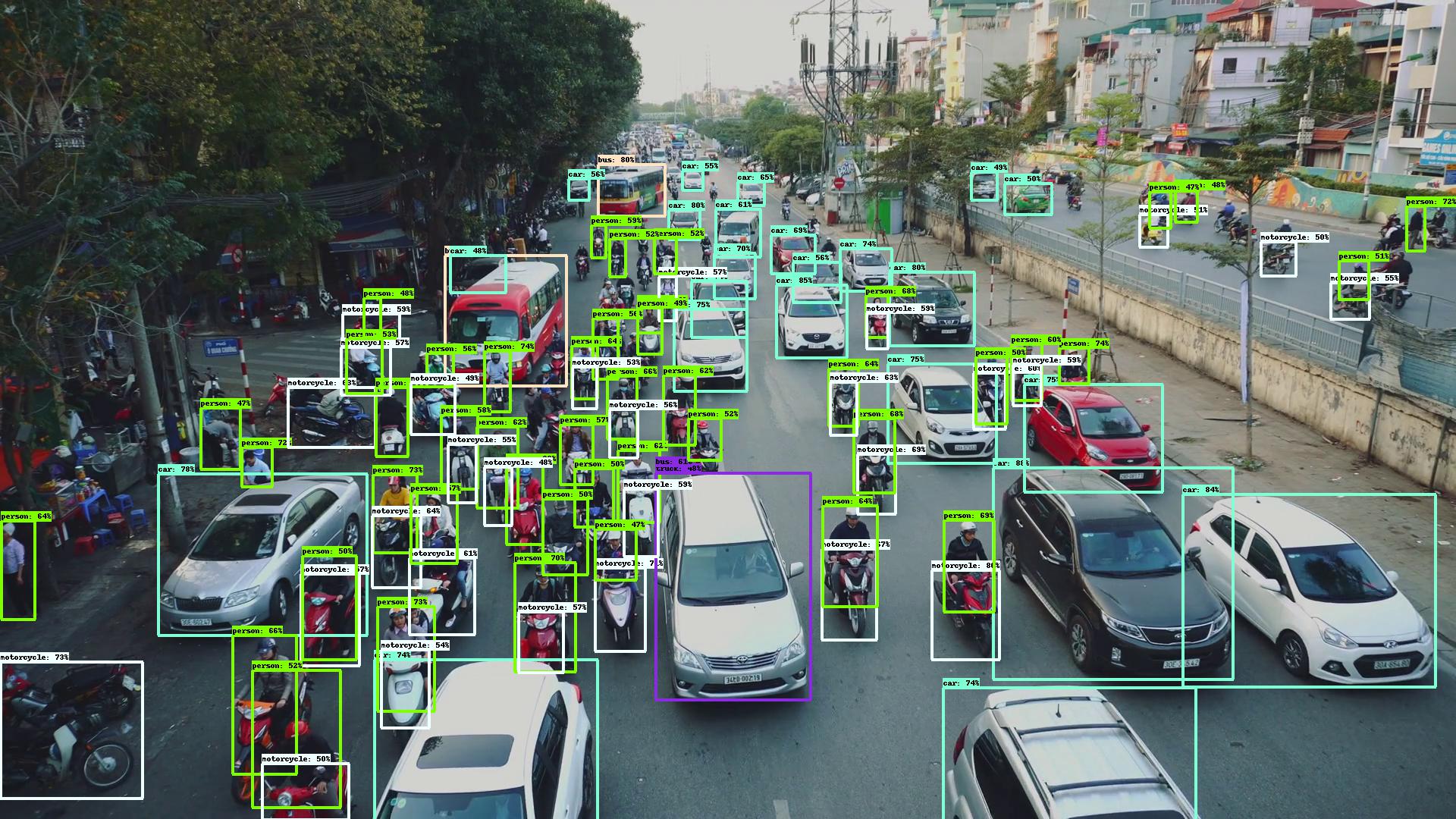
Appreciate the great work from the following repositories:
- google/automl
- lukemelas/EfficientNet-PyTorch
- signatrix/efficientdet
- vacancy/Synchronized-BatchNorm-PyTorch
If you like this repository, or if you'd like to support the author for any reason, you can donate to the author. Feel free to send me your name or introducing pages, I will make sure your name(s) on the sponsors list.

Sincerely thank you for your generosity.