
ComfyUI-VRAM-Manager (formerly ComfyUI-DistorchMemoryManager) is an independent memory management custom node for ComfyUI. Provides Distorch memory management functionality for efficient GPU/CPU memory handling. Supports purging of SeedVR2, Qwen3-VL, and Nunchaku models (FLUX/Z-Image/Qwen-Image). Includes Model Patch Memory Cleaner for ModelPatchLoader workflows.
This custom node was created to address OOM (Out Of Memory) issues in video generation workflows like Upscaling with WAN2.2. The key point is that these OOM errors are caused by system RAM shortage, not VRAM shortage (can occur even on 64GB RAM systems depending on resolution and video length).
This is a completely original implementation designed specifically for Distorch memory management. Simply place it in the custom_nodes folder for easy installation and removal.
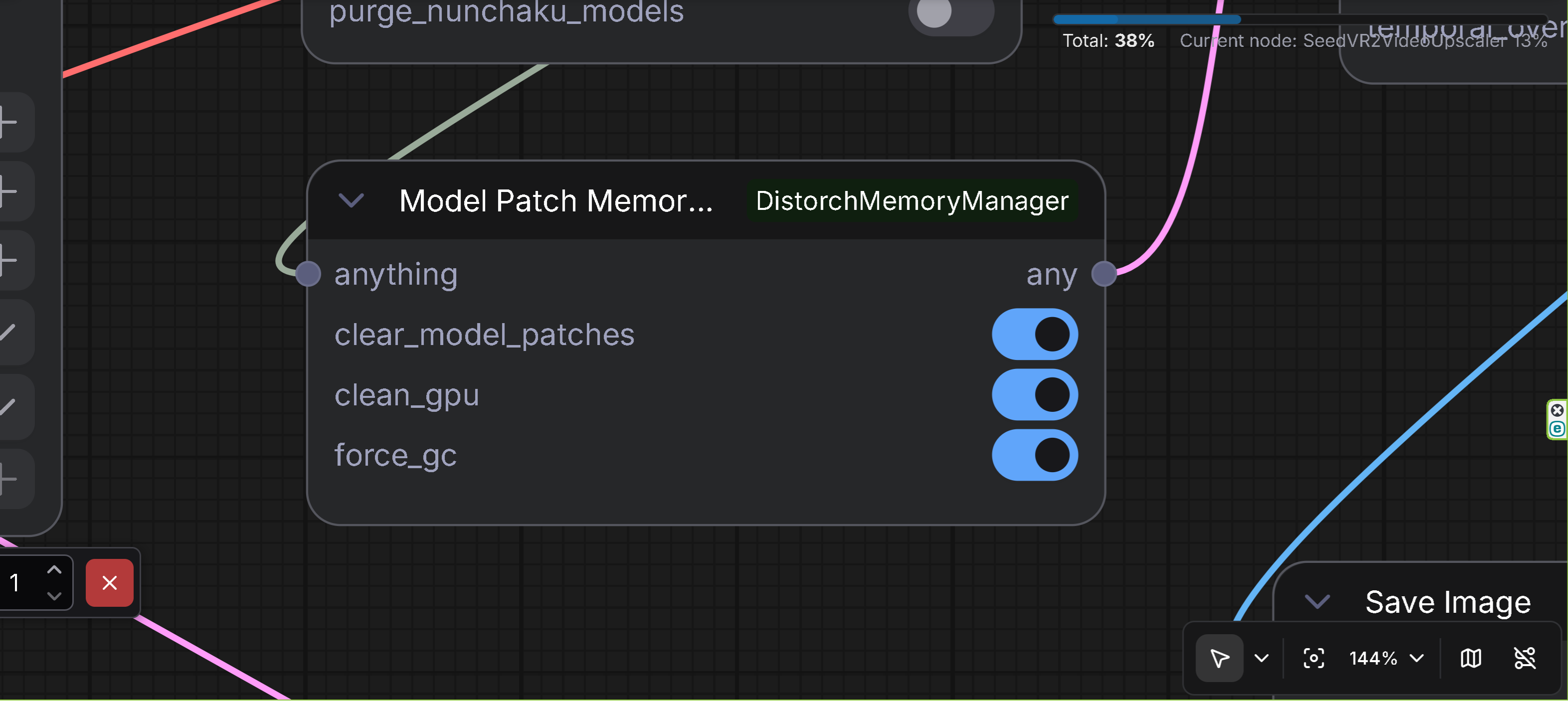
- Description: Memory cleaner specifically for ModelPatcher loaded model patches
- Features: Clears model patches loaded via ModelPatchLoader to prevent OOM during upscaling
- Input: Any data type (ANY) passthrough
- Output: Any data type (ANY) passthrough
- Options:
clear_model_patches: Clear model patches loaded via ModelPatchLoader (default: True)clean_gpu: Clear GPU memory (default: True)force_gc: Force garbage collection (default: True)
- Use Case: Place this node after using ModelPatchLoader (e.g., Z-Image ControlNet, QwenImage BlockWise ControlNet, SigLIP MultiFeat Proj) and before upscaling operations to prevent OOM errors. This node is designed for patch model format loaded via ModelPatchLoader, which is an exceptional format different from standard ControlNet models.
- Technical Details:
- Detects ModelPatcher instances with
additional_modelsorattachmentscontaining model patches - Safely unloads model patches from VRAM
- Performs cleanup_models_gc() to prevent memory leaks
- Detects ModelPatcher instances with
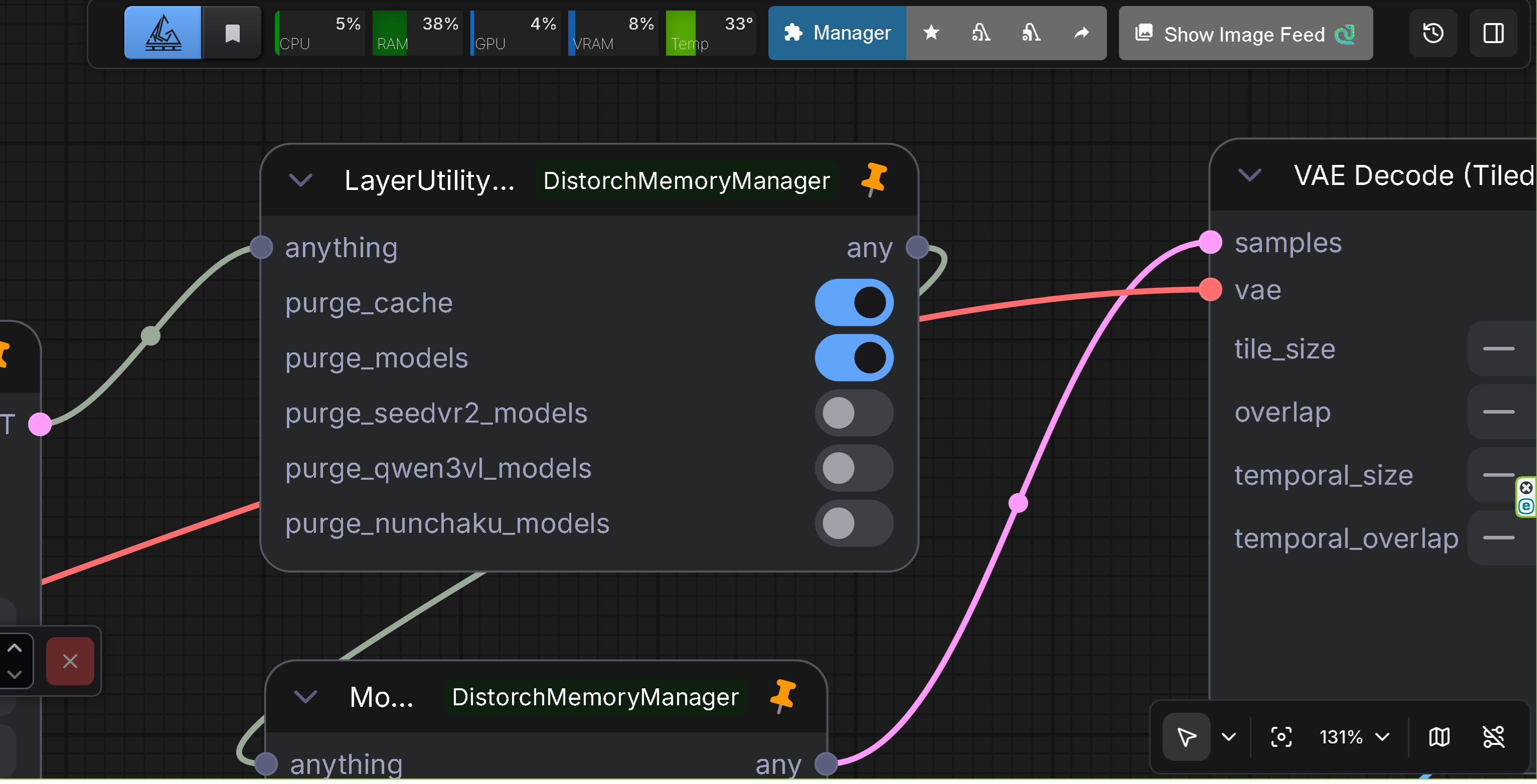
- Description: Restored LayerStyle's LayerUtility: Purge VRAM V2 inside the Distortch suite (original node) with enhanced model unloading capabilities, SeedVR2 support, and Qwen3-VL/Nunchaku model purging
- Features: Identical UI/behavior; keeps legacy workflows working without LayerStyle. Enhanced in v1.2.0 with more aggressive model unloading and improved error handling. Enhanced in v2.0.0 with Qwen3-VL and Nunchaku model purging support. Enhanced in v2.2.0 with Nunchaku SDXL model support. Now supports SeedVR2 DiT and VAE model purging, Qwen3-VL models, and Nunchaku models (FLUX/Z-Image/Qwen-Image/SDXL).
- Input: Any data type (ANY) passthrough
- Options:
purge_cache: Rungc.collect(), flush CUDA caches, calltorch.cuda.ipc_collect()purge_models: Enhanced model unloading (v1.2.0):- Calls
cleanup_models()to remove dead models - Calls
cleanup_models_gc()for garbage collection - Marks all models as not currently used
- Aggressively unloads models via
model_unload() - Calls
soft_empty_cache()if available
- Calls
purge_seedvr2_models: Clear SeedVR2 DiT and VAE models from cache- Clears all cached DiT models from SeedVR2's GlobalModelCache
- Clears all cached VAE models from SeedVR2's GlobalModelCache
- Clears runner templates
- Properly releases model memory using SeedVR2's release_model_memory()
purge_qwen3vl_models: Clear Qwen3-VL models from GPU memory (v2.0.0)- Searches for Qwen3-VL models in sys.modules and gc.get_objects()
- Handles device_map="auto" case for multi-device models
- Clears model parameters, buffers, and internal state
purge_nunchaku_models: Clear Nunchaku models (FLUX/Z-Image/Qwen-Image/SDXL) from GPU memory (v2.0.0, Enhanced in v2.2.0)- Supports NunchakuFluxTransformer2dModel, NunchakuZImageTransformer2DModel, NunchakuQwenImageTransformer2DModel, and NunchakuSDXLUNet2DConditionModel (v2.2.0)
- Disables CPU offload before clearing models
- Searches in sys.modules, ComfyUI current_loaded_models, and gc.get_objects()
- Clears cache and temporary data attributes (v2.2.0)
- Handles NunchakuSDXL wrapper class with diffusion_model access (v2.2.0)
- Enhancements in v1.2.0:
- More aggressive model unloading with proper error handling
- None checks and callable() checks for all method calls
- Improved error messages and logging
- Safe handling of models with None real_model references
- SeedVR2 model support for clearing DiT and VAE models
- Enhancements in v2.0.0:
- Qwen3-VL model purging with device_map="auto" support
- Nunchaku model purging (FLUX/Z-Image/Qwen-Image) with CPU offload handling
- Enhanced CUDA cache clearing for all devices
- Comprehensive debug logging for model detection and purging
- Fixed any() function name collision with AnyType
- Changed display name to ComfyUI-VRAM-Manager
- Enhancements in v2.2.0:
- Nunchaku SDXL model purging support (NunchakuSDXLUNet2DConditionModel)
- NunchakuSDXL wrapper class detection and handling
- Cache and temporary data clearing for all Nunchaku detection methods
- More aggressive garbage collection (3x gc.collect()) and CUDA cache clearing
- Improved VRAM release for Nunchaku SDXL models (approximately 2.5GB)
- Preserves model structure while clearing top-level parameters only
- Reason: The original LayerStyle node disappeared upstream, so we duplicated it here to keep older workflows alive. Enhanced in v1.2.0 to provide better memory management. SeedVR2 support added to handle SeedVR2's independent model caching system. Enhanced in v2.0.0 to support Qwen3-VL and Nunchaku models, which are not managed by ComfyUI's standard model_management. Enhanced in v2.2.0 to support Nunchaku SDXL models, which require special handling due to their wrapper class structure and need for cache clearing.
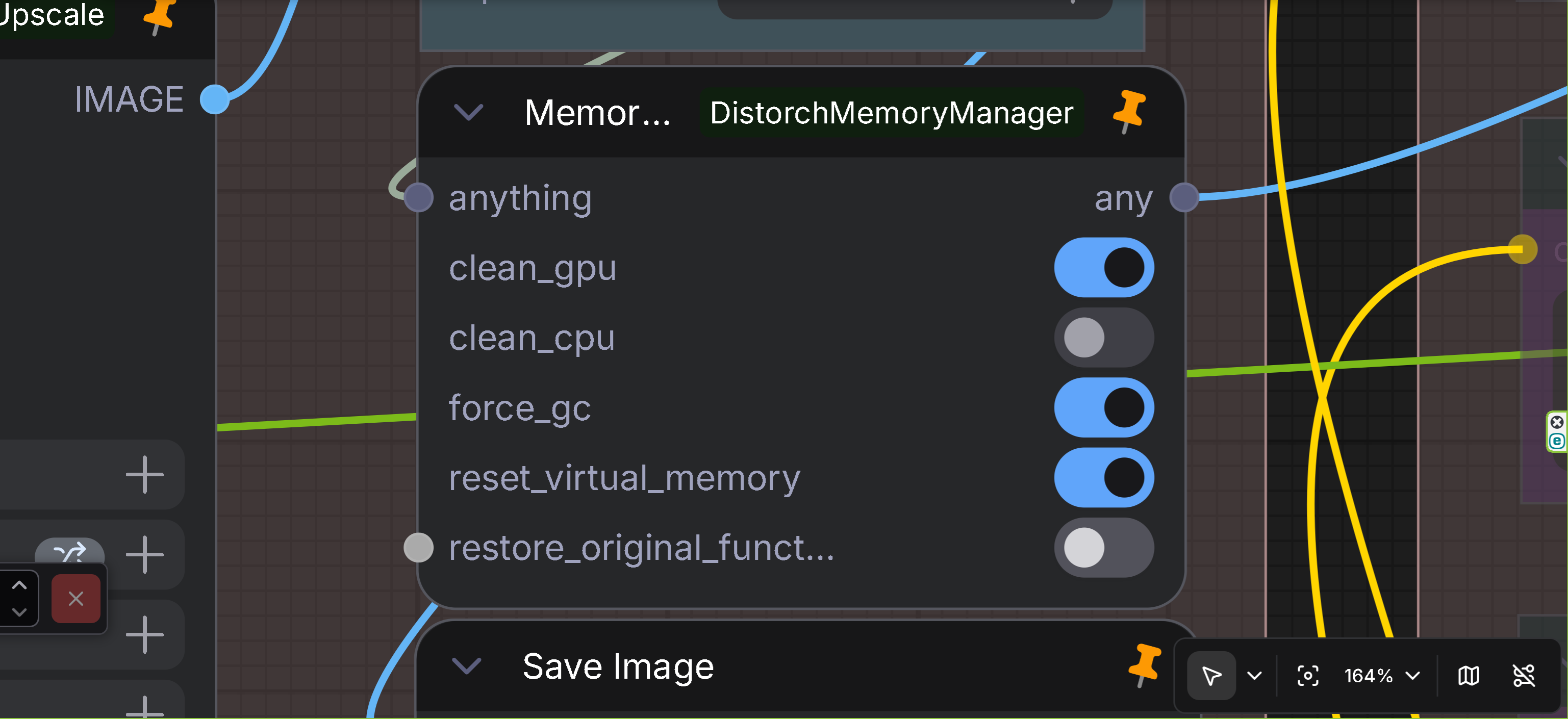
- Description: Comprehensive memory management node (for advanced users)
- Features: Detailed memory management with UI corruption protection
- Input: Any data type (ANY)
- Output: Any data type (ANY)
- Options:
clean_gpu: Clear GPU memoryclean_cpu: Clear CPU memory (use with caution)force_gc: Force garbage collectionreset_virtual_memory: Reset virtual memoryrestore_original_functions: Restore original functions
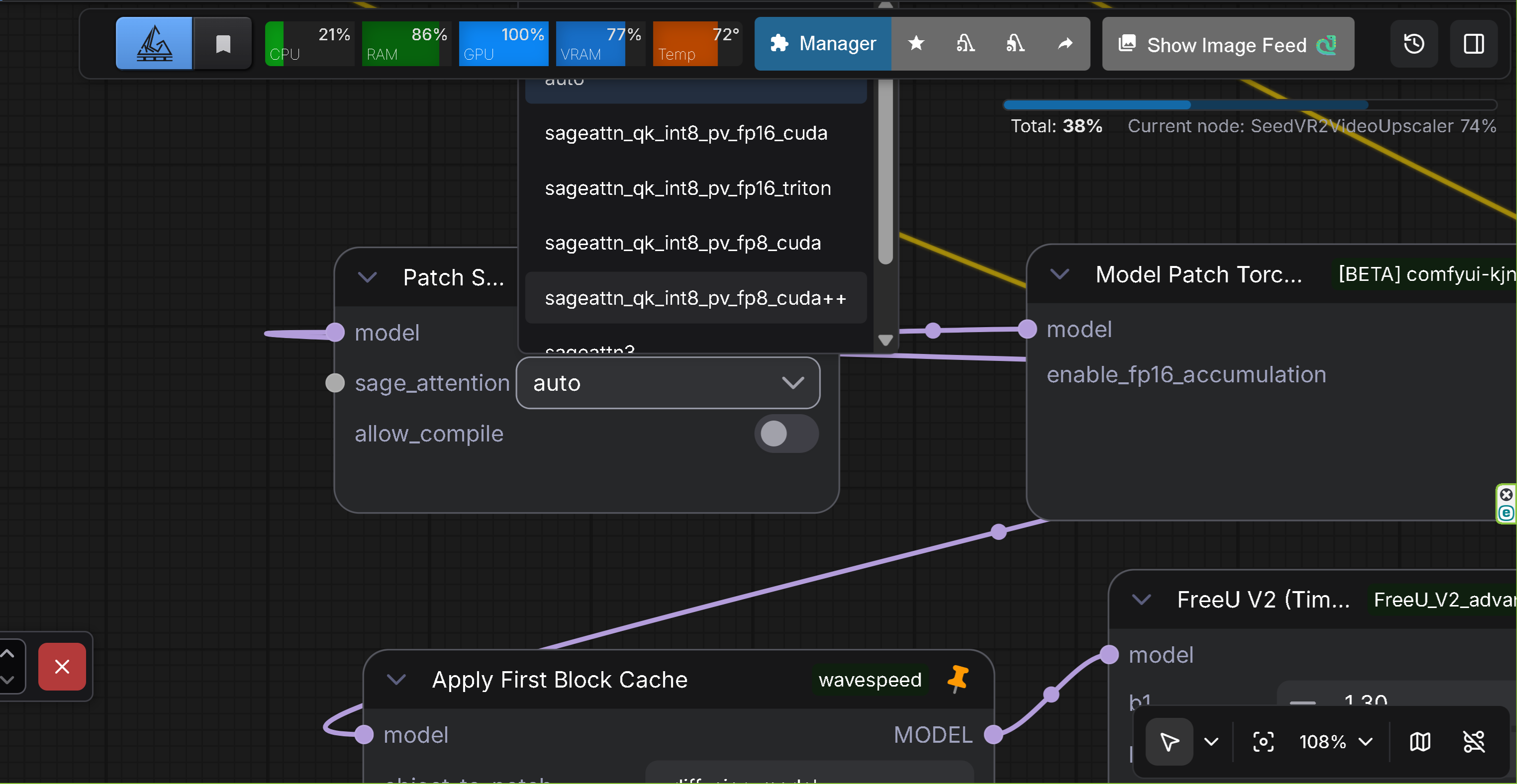
- Description: Experimental node for patching ComfyUI's attention mechanism to use SageAttention
- Features: Replaces ComfyUI's standard attention with SageAttention for improved memory efficiency and performance
- Input: Model (MODEL)
- Output: Model (MODEL)
- Options:
sage_attention: SageAttention mode selectiondisabled: Disable SageAttention (restore original attention)auto: Automatic SageAttention implementationsageattn_qk_int8_pv_fp16_cuda: CUDA implementation (QK int8, PV FP16)sageattn_qk_int8_pv_fp16_triton: Triton implementation (QK int8, PV FP16)sageattn_qk_int8_pv_fp8_cuda: CUDA implementation (QK int8, PV FP8)sageattn_qk_int8_pv_fp8_cuda++: CUDA implementation (QK int8, PV FP8, optimized)sageattn3: SageAttention 3 implementation (Blackwell support)sageattn3_per_block_mean: SageAttention 3 implementation (per-block mean version)
allow_compile: Allow torch.compile for SageAttention function (requires sageattn 2.2.0 or higher, default: False)
- Use Case: Use this node to replace ComfyUI's attention mechanism with SageAttention for better memory efficiency and performance. The node patches attention on each model execution and automatically cleans up afterward.
- Technical Details:
- Uses ComfyUI's callback system (ON_PRE_RUN, ON_CLEANUP) to patch attention dynamically
- Automatically detects SageAttention version and logs detailed information
- Handles Flash-Attention state detection and logging when disabled
- Compatible with ComfyUI's attention function format via wrap_attn decorator
- Supports multiple SageAttention implementations (CUDA, Triton, SageAttention 3)
- Clone or download to
ComfyUI/custom_nodes/directory:
cd ComfyUI/custom_nodes
git clone https://github.com/ussoewwin/ComfyUI-DistorchMemoryManager.git- Install dependencies:
cd ComfyUI-DistorchMemoryManager
pip install -r requirements.txt- Restart ComfyUI
- Nodes will appear in the "Memory" category in the node palette
- Add any memory management node to your workflow
- Connect any data to the input
- Configure options as needed
- Connect output to the next node
For ModelPatchLoader workflows:
[ModelPatchLoader] → [QwenImageDiffsynthControlnet] → [Model Patch Memory Cleaner] → [Upscaling Node]
For general memory management:
[Previous Node] → [Memory Manager] → [Next Node]
For ModelPatchLoader workflows (patch model format):
- Use Model Patch Memory Cleaner
clear_model_patches: Trueclean_gpu: Trueforce_gc: True- Place after: ModelPatchLoader usage, before upscaling operations
- Note: This is for patch model format loaded via ModelPatchLoader (e.g., Z-Image ControlNet, QwenImage BlockWise ControlNet, SigLIP MultiFeat Proj), which is an exceptional format different from standard ControlNet models.
For video generation (WAN2.2, etc.):
- Use Memory Manager
clean_gpu: Trueforce_gc: Truereset_virtual_memory: True
For maximum memory release:
- Use Memory Manager
clean_cpu: True(Warning: possible UI corruption)
Solution:
- For ModelPatchLoader workflows: Use Model Patch Memory Cleaner after ControlNet usage
- For general workflows: Use Memory Manager
- Enable
clean_gpuandreset_virtual_memory - Enable
force_gcif needed
Solution:
- Add Model Patch Memory Cleaner node after QwenImageDiffsynthControlnet (when using ModelPatchLoader)
- Enable
clear_model_patches: True - Enable
clean_gpu: True - Enable
force_gc: True - Note: This applies to patch model format loaded via ModelPatchLoader, not standard ControlNet models
Solution:
- Use Model Patch Memory Cleaner or Memory Manager
- Keep
clean_cpudisabled (if using Memory Manager) - Enable only essential options
Solution:
- Use DisTorchPurgeVRAMV2 node
- Enable
purge_qwen3vl_models: Trueto clear Qwen3-VL models from GPU memory - Enable
purge_cache: Trueandpurge_models: Truefor comprehensive cleanup - The node handles device_map="auto" case for multi-device models automatically
Solution:
- Use DisTorchPurgeVRAMV2 node
- Enable
purge_nunchaku_models: Trueto clear Nunchaku models from GPU memory - The node automatically disables CPU offload before clearing models
- Enable
purge_cache: Trueandpurge_models: Truefor comprehensive cleanup - Works with NunchakuFluxTransformer2dModel, NunchakuZImageTransformer2DModel, NunchakuQwenImageTransformer2DModel, and NunchakuSDXLUNet2DConditionModel (v2.2.0)
- For Nunchaku SDXL models, the node now clears cache and temporary data attributes, releasing approximately 2.5GB of VRAM (v2.2.0)
- GPU memory clearing (
torch.cuda.empty_cache()) - GPU synchronization (
torch.cuda.synchronize()) - CPU memory clearing (
gc.collect()) - Virtual memory reset (
comfy.model_management.free_memory()) - Model patch detection and unloading (v1.2.0)
- Detects ModelPatcher instances with
additional_modelsorattachmentscontaining patch model format - Safely unloads model patches via
model_unload() - Removes from
current_loaded_modelslist - Performs
cleanup_models_gc()to prevent memory leaks - Handles exceptional patch model format loaded via ModelPatchLoader (different from standard ControlNet)
- Detects ModelPatcher instances with
- Qwen3-VL model purging (v1.4.0)
- Searches for Qwen3-VL models in sys.modules and gc.get_objects()
- Handles device_map="auto" case for multi-device models
- Clears model parameters, buffers, and internal state
- Supports hf_device_map processing for distributed models
- Nunchaku model purging (v1.4.0, Enhanced in v2.2.0)
- Supports NunchakuFluxTransformer2dModel, NunchakuZImageTransformer2DModel, NunchakuQwenImageTransformer2DModel, and NunchakuSDXLUNet2DConditionModel (v2.2.0)
- Automatically disables CPU offload before clearing models
- Searches in sys.modules, ComfyUI current_loaded_models, and gc.get_objects()
- Handles nested model structures (ModelPatcher, ComfyFluxWrapper)
- Clears offload_manager to release offloaded memory
- NunchakuSDXL wrapper class detection and diffusion_model access (v2.2.0)
- Cache and temporary data clearing (_cache, _state_dict_cache, _non_persistent_buffers_set) (v2.2.0)
- More aggressive garbage collection and CUDA cache clearing for better VRAM release (v2.2.0)
- Safe implementation to prevent UI corruption
- Error handling with exception processing
- Gradual memory clearing
- None checks and callable() checks for all method calls (v1.2.0)
- Robust error handling in cleanup_models() and is_dead() methods
- Expanding paging file size can also reduce OOM occurrences during upscaling
- Note: For OOM during video generation inference (where VRAM is critical), paging file expansion won't help
- For ModelPatchLoader workflows: Always use Model Patch Memory Cleaner before upscaling to prevent OOM. Note that patch model format loaded via ModelPatchLoader is an exceptional format different from standard ControlNet models.
- For Qwen3-VL workflows: Use DisTorchPurgeVRAMV2 with
purge_qwen3vl_models: Trueafter Qwen3-VL model usage to prevent OOM. The node automatically handles device_map="auto" case for models distributed across multiple devices. - For Nunchaku workflows (FLUX/Z-Image/Qwen-Image/SDXL): Use DisTorchPurgeVRAMV2 with
purge_nunchaku_models: Trueafter Nunchaku model usage to prevent OOM. The node automatically disables CPU offload and clears models from all detection locations (sys.modules, ComfyUI model management, and gc.get_objects()). For Nunchaku SDXL models (v2.2.0), the node now includes cache clearing functionality that can release approximately 2.5GB of VRAM. - For SageAttention workflows (v2.3.0): Use Patch Sage Attention DM node to replace ComfyUI's attention mechanism with SageAttention for improved memory efficiency and performance. The node supports multiple SageAttention implementations and automatically patches attention on each model execution. To disable SageAttention, run the node again with
sage_attentionset todisabled.
Apache License 2.0 - See LICENSE file for details
Bug reports and feature requests are welcome on the GitHub Issues page.
See CHANGELOG.md for detailed release history.
ComfyUI-VRAM-Manager (formerly ComfyUI-DistorchMemoryManager) - Independent memory management custom node for ComfyUI with Distorch support

