We designed some UML models to assist design and communicate the functionality of our design to others. Final implementation may not reflect exact design outlined by the following diagrams as technical issues and time contsraints changed what was eventually coded.

The use case diagram was primarily used for prototyping, functions such as 'notify creator/subscriber' were not implemented for example.
Use Case Descriptions
-
Engage with post
- While browsing the blogs and content on the site the user should have the option to interact with the content in some way. This takes the form of like/react/share/comment/etc. The Creator of said post is notified based on their specific user settings, for example by default a post, the creator will be notified for a comment, but not for a like.
-
Create/Edit post
- This use case is probably the most important one for the creator user. It allows them to publish content on the site. This use case is the precursor to any change the creator makes to the content they have put on the site. These changes can take the form of deletion/creation/edit and more. This use case will be implemented in the form of a powerful user interface that will allow the user to make nearly any change they would want to make.
-
Update Blog Status
- This use case is more of a back-end kind of use case, however, it is something that has large implications on the project. The status is updated any time a user interacts with it or a creator makes a change or content update of some kind. A central function of this use case is to manage notifications, since many users may need to receive notifications depending on the kind of update being pushed.
-
Log in
- Standard in many kinds of modern web apps and websites. In order to do user-specific tasks, the user is required to log in. A creator is required to log in in order to perform any task on the site. A consumer is only required to log in when they want to interact with a post, subscribe, or do anything else that isn’t passively viewing content on the site.
-
Browse Drafts
- As part of our content creation tools, we want creators to be able to save their progress when working on content for the site. This use case allows a creator to access their saved work. Most of the time when a creator would utilize this feature it would end up going into the Create/Edit post-use case. However, a user may choose only to view their saved work, which is why it is classified as an extended relationship in the use case diagram.
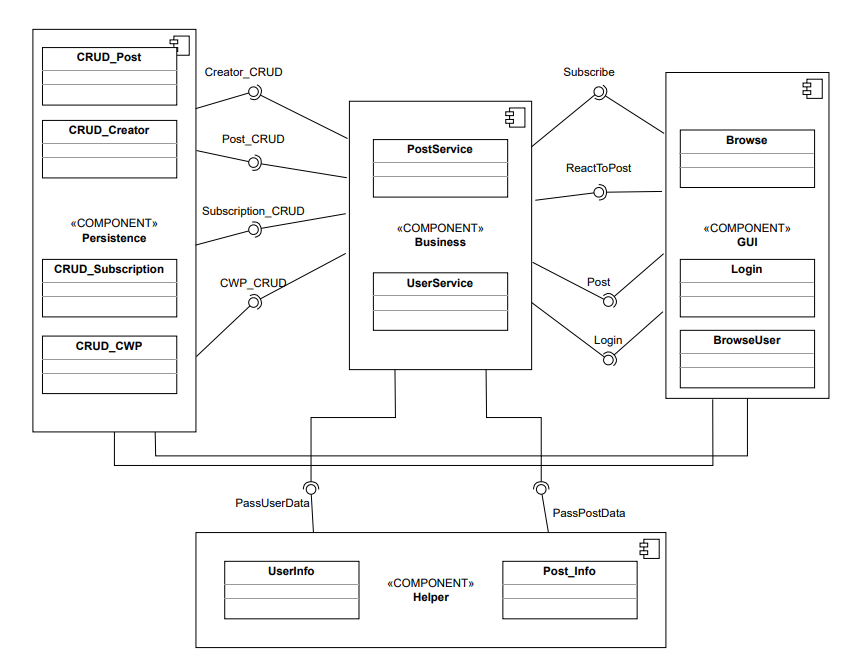
This Component Diagram contains 4 Components namely:
Persistence - The Persistence Component is the Component that interacts with the database. It receives, sends and modifies the data in the database used for the system. This Component contains the following classes: CRUD_Post, CRUD_Creator, CRUD_Subscription and CRUD_CWP. The component offers the following interfaces: Creator_CRUD, Post_CRUD, Subscription_CRUD and CWP_CRUD. It also requires the following interfaces: PassUserData and PassPostData.
Business - The Business Component is the brain of the system. It contains the classes that receive data and converts it into information for the system. The component contains the following classes: PostService and UserService. The component provides the following interfaces: Subscribe, ReactToPost, Post and Login. This component requires the following interfaces: PassUserData and PassPostData. This component needs the following interfaces: Creator_CRUD, Post_CRUD, Subscription_CRUD and CWP_CRUD.
GUI - The GUI Component is the component that interacts with the user and sends the interactions to the Business Component and sends the response back to the User. This Component contains the following classes: Browse, BrowseUser and Login. The component needs the following interfaces: Subscribe, ReactToPost, Post, Login, PassUserData and PassPostData.
Helper - The Helper Component is used to pass between the other components in the system. The Component contains the following classes: UserInfo and Post_info. The Component provides the following interfaces: PassUserData and PassPostData. All the other components are connected to this component through those interfaces mentioned above.
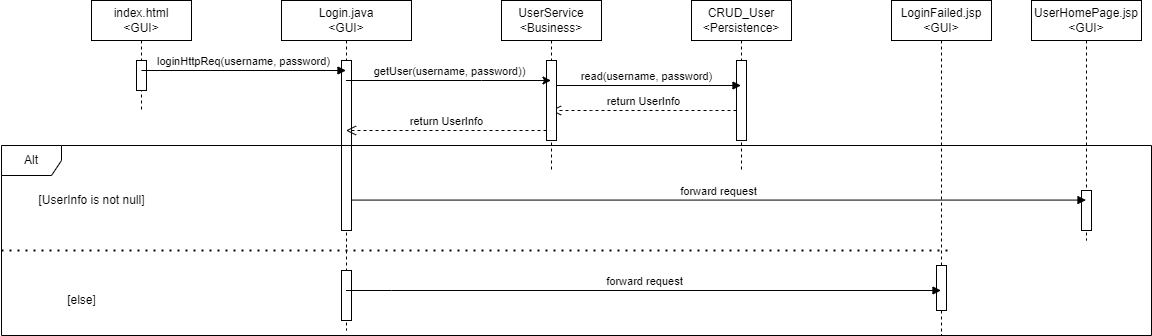
Login Sequence Diagram 1
- We start at index.html, which is the login page where the user can enter 2 parameters, username and password.
- These parameters are then passed to the business layer which handles the Persistence layer.
- Eventually, the user which corresponds to the information entered in index.html is returned to Login.java.
- Based on if this user exists or not, the request is forwarded to one of two pages.
- Login sequence complete
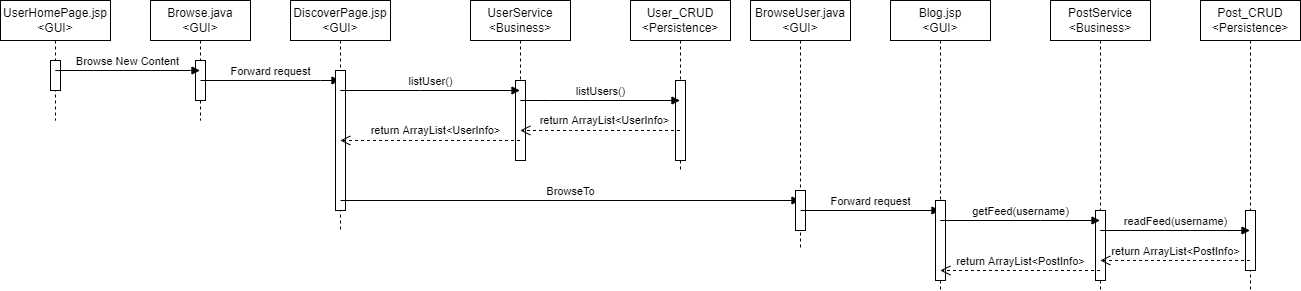
Login Sequence Diagram 2
- Starting off from the UserHomePage.jsp, which is where the login sequence diagram leads if the information was entered correctly, the user chooses to browse the site for new content.
- We then find ourselves at DiscoverPage.jsp, which must list out all the users on the site. In order to retrieve the relevant user information, we utilize the * Business(and then Persistence) layer once again to retrieve information from our database.
- Once the user has selected a blog page they would like to look at, they are redirected to Blog.jsp. On this page we must also list all the relevant post information, we utilize the Business(and then Persistence) layer once again to retrieve information from our database.
- The user has now successfully browsed the site for a blog.
We used mysql to create a simple database to store user and post information, this diagram may not refelct the final state of the database. For example, images are not a seperate table.
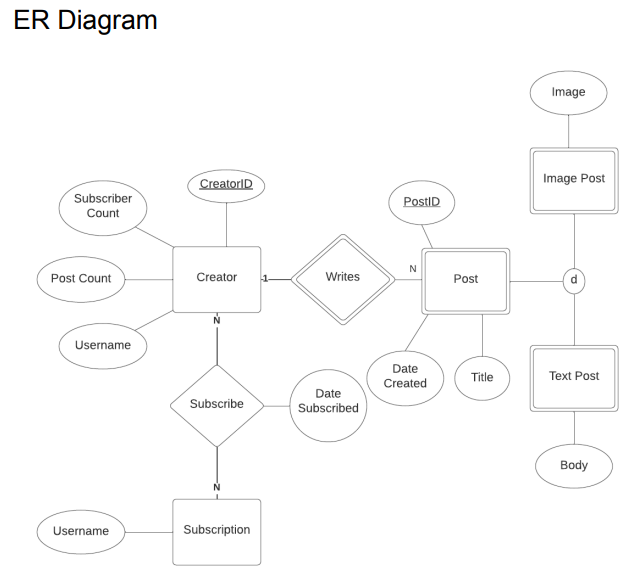
SQL to create tables:
CREATE TABLE Creator (
username VARCHAR(50),
password VARCHAR(50),
postcount INT NOT NULL,
subscribercount INT NOT NULL,
id INT NOT NULL AUTO_INCREMENT,
PRIMARY KEY(id),
UNIQUE (username)
);

CREATE TABLE Subscriptions (
username VARCHAR(50),
creatorid INT NOT NULL,
FOREIGN KEY (creatorid) REFERENCES Creator (id),
PRIMARY KEY (creatorid)
);


CREATE TABLE Post(
title VARCHAR(250),
datecreated DATE,
id INT NOT NULL AUTO_INCREMENT,
type VARCHAR(10),
body VARCHAR(5000),
image TEXT,
PRIMARY KEY(id)
);

CREATE TABLE CreatorWritesPost(
creatorid INT,
postid INT,
FOREIGN KEY (creatorid) REFERENCES Creator (id),
FOREIGN KEY (postid) REFERENCES Post (id),
PRIMARY KEY (postid, creatorid)
);