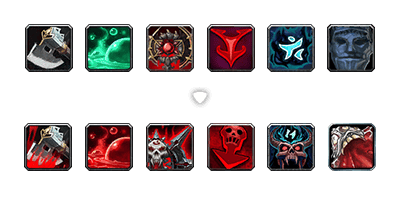
Compare and extract different icons between Global and CN World of Warcraft versions to override censored content.
📖 Table of Contents
You can download the prebuilt icon pack from NGA.cn
- Rust 1.70 or later
- Any OS that supports Rust (Windows, macOS, Linux)
- World of Warcraft (Global and CN versions)
- Go to the Releases page
- Download the latest binary for your platform:
- Windows:
uncensor-icon-windows.exe - Linux:
uncensor-icon-linux - macOS:
uncensor-icon-macos
- Windows:
- Place it in a convenient location
-
Install Rust from https://rustup.rs/
-
Clone this repository:
git clone https://github.com/wind-addons/uncensor-icon.git cd uncensor-icon -
Build the project:
cargo build --release
-
The executable will be in
target/release/uncensor-icon.exe
You need to extract the icon files from both WoW versions first:
- Open Battle.net, go to Game Settings for each WoW version
- Add
-consoleto "Additional command line arguments" - Start each WoW version, go to character selection screen
- Press
~to open console, typeexportInterfaceFiles art - Wait for it to finish (creates
BlizzardInterfaceArt\Interface\ICONSfolders)
uncensor-icon `
    --global-dir "C:\WoW\Global\_retail_\BlizzardInterfaceArt\Interface\ICONS" `
    --cn-dir "C:\WoW\CN\_retail_\BlizzardInterfaceArt\Interface\ICONS" `
--output-dir "C:\WoW\CN\_retail_\Interface\ICONS"uncensor-icon [OPTIONS]
Required:
--global-dir <DIR> Path to Global WoW icons folder
--cn-dir <DIR> Path to CN WoW icons folder
--output-dir <DIR> Where to copy the different icons
Optional:
--blacklist <FILES> Files to skip (default: XP_ICON.BLP,XPBonus_Icon.blp,Garr_CurrencyIcon-Xp.blp)
--help Show help messageBy default, these files are excluded from comparison as they contain localized text that naturally differs between versions:
XP_ICON.BLP- Experience bar icons with localized textXPBonus_Icon.blp- Bonus experience icons with localized textGarr_CurrencyIcon-Xp.blp- Garrison experience icons with localized text
Basic Usage
uncensor-icon `
    --global-dir "C:\Games\WoW\_retail_\BlizzardInterfaceArt\Interface\ICONS" `
    --cn-dir "C:\Games\WoW CN\_retail_\BlizzardInterfaceArt\Interface\ICONS" `
    --output-dir "C:\Games\WoW CN\_retail_\Interface\ICONS"
With Custom Blacklist
uncensor-icon `
    --global-dir "C:\Games\WoW\_retail_\BlizzardInterfaceArt\Interface\ICONS" `
    --cn-dir "C:\Games\WoW CN\_retail_\BlizzardInterfaceArt\Interface\ICONS" `
    --output-dir "C:\Games\WoW CN\_retail_\Interface\ICONS" `
--blacklist "XP_ICON.BLP,bad_icon.blp,temp.blp,custom_icon.blp"- Install Rust from https://rustup.rs/
- Clone or download this project
- Run:
cargo build --release - The executable will be in
target/release/uncensor-icon.exe
MIT
