Extras
Here are the textures you can change with the ZThemeExtras.
Copy the texture that you want to change from the ZThemeExtras to whatever folder it needs to be copied to. See below for details and the places you should copy the texture to.
If there's a VARIANTx suffix in the texture name, remove the VARIANTx suffix from the variant you choose and place it in the folder.
Texture name: PartItem_Normal.png
Folder: VAB
Makes some parts easier to see (especially with Restock)

Texture name: PartListBackground#128x1024.png
Folder: VAB
Reverts the part list background to the old, lighter one.

Texture name: rect_round_dark#69x69VARIANTx.png rect_round_highlight#69x69VARIANTx.png
Folder: UI
Changes the color of some buttons. Default is VARIANT4
-
rect_round_dark#69x69VARIANT1 & 2 should userect_round_highlight#69x69VARIANT2.png -
rect_round_dark#69x69VARIANT3 & 4 should userect_round_highlight#69x69VARIANT1.png

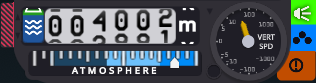
Texture name: FlightTopBarExtended_ASL_AGL_with_shadows.png (in the LightTumblerBackgrounds folder)
Folder: flight
Reverts the dark background of the altimeter to the light pre-v0.9.5 one.
Also delete tumblerColorPositive and tumblerColorNegative in the config file.