




Documentation · npm package · Quick start · Core exports · Contributing
snappycart is a headless React cart package for teams that want full control over cart UX without building cart state from scratch.
It gives you the core cart engine, optional UI components, and a clean integration path, so you can move faster without getting locked into a heavy commerce platform.
Most cart solutions are either too basic or too opinionated.
snappycart gives you the core cart engine and UI building blocks, so you can ship your own cart UX without fighting a framework.
- Headless by default: bring your own UI, or use the included drawer and cart icon
- Type-safe: first-class TypeScript types and predictable APIs
- Composable: works with different React app architectures, from small SPAs to larger storefronts
- Focused: solves cart state cleanly without dragging in a full commerce platform
- Built to grow: structured for future extensions without forcing a rewrite
- cart primitives:
addItem,removeItem,increment,decrement,setQuantity,clear - React context and hook:
CartProvider,useCart - optional UI components:
CartDrawer,CartIcon - flexible product model with support for custom metadata
- derived cart values like
totalItemsandsubtotal
| Export | Type | Purpose |
|---|---|---|
CartProvider |
Provider | Wraps your app with cart state |
useCart |
Hook | Access cart actions and derived state |
CartDrawer |
UI component | Optional ready-made cart drawer |
CartIcon |
UI component | Optional cart trigger |
| Audience | Why snappycart fits |
|---|---|
| React developers | Add cart functionality without adopting a full commerce platform |
| Frontend engineers | Keep full control over UI while reusing solid cart state logic |
| Product teams | Ship custom cart flows faster with a lightweight foundation |
| Contributors | Improve the package, tests, demo app, or docs in an open repo |
For package consumers:
npm install snappycartTo use the provided styles:
import "snappycart/styles.css";1. Wrap your app with CartProvider
import { CartProvider } from "snappycart";

export function App() {
    return (
        <CartProvider>
            <Storefront />
        </CartProvider>
    );
}
2. Add products to the cart with useCart
import { useCart } from "snappycart";

export function AddToCartButton() {
    const { addItem } = useCart();

    return (
        <button
            onClick={() =>
                addItem(
                    {
                        id: "sku_123",
                        name: "Coffee Beans",
                        price: 12.99,
                        imageUrl: "/images/coffee-beans.jpg",
                    },
                    1
                )
            }
        >
            Add to cart
        </button>
    );
}
3. Use the optional cart UI
import { useState } from "react";
import { CartDrawer, CartIcon, useCart } from "snappycart";
import "snappycart/styles.css";

export function Storefront() {
    const [open, setOpen] = useState(false);
    const { totalItems } = useCart();

    return (
        <>
            <CartIcon onClick={() => setOpen(true)} />
            <CartDrawer
                open={open}
                onClose={() => setOpen(false)}
                title={`Your cart (${totalItems})`}
            />
        </>
    );
}
4. Access cart state anywhere
import { useCart } from "snappycart";

export function CartSummary() {
    const { items, subtotal, totalItems, clear } = useCart();

    return (
        <section>
            <p>Total items: {totalItems}</p>
            <p>Subtotal: £{subtotal.toFixed(2)}</p>
            <button onClick={clear}>Clear cart</button>

            <ul>
                {items.map((item) => (
                    <li key={item.product.id}>
                        {item.product.name} × {item.quantity}
                    </li>
                ))}
            </ul>
        </section>
    );
}Explore the docs for setup, usage, and UI customization:
For contribution workflow and repository-specific guidance, see CONTRIBUTING.md.
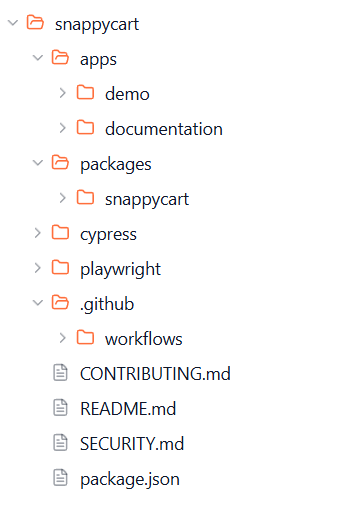
This repository is a workspace monorepo. Not every folder matters to every contributor.
-
packages/snappycart
The publishable npm package. This is the main folder for developers working on snappycart itself. -
apps/demo
Demo app for testing and showcasing the package in a real UI. -
apps/documentation
Documentation site source. Most package users do not need this folder. -
cypress
Cypress testing setup and support files. -
playwright
Playwright testing setup. -
.github/workflows
CI and automation workflows.
snappycart/
├── apps/
│   ├── demo/
│   └── documentation/
├── packages/
│   └── snappycart/
├── cypress/
├── playwright/
├── .github/
│   └── workflows/
├── CONTRIBUTING.md
├── README.md
├── SECURITY.md
└── package.json
If you are using snappycart in your own app, the main thing you care about is:
packages/snappycart
If you are contributing to docs, go to:
apps/documentation
If you are contributing tests, you will mostly care about:
cypressplaywrightpackages/snappycartapps/demo
snappycart is developed in the open, and contributions are welcome.
You can contribute through:
- bug fixes
- test coverage
- docs improvements
- package enhancements
- demo improvements
- CI and workflow polish
Start here:
If you cloned the repository locally for development, install dependencies from the root and build the workspaces before working across the repo:
npm install
npm run build
You can then either work from the repo root with workspace commands, or move into a specific workspace and run that folder’s local scripts.
snappycart is MIT licensed ↗
