This is a collection of filters for Angular that implement basic ciphers.

#Installation
angular-cipher-filters is available from Bower and you can install the latest version like this:
$ bower install angular-cipher-filtersDon't forget to inject the zsoltiii.angular-cipher-filters module in your angular app and include either file from the dist folder in the web page.
#Ciphers
A cipher is a means of concealing a message, where letters of the message are substituted or transposed for other letters, letter pairs, and sometimes for many letters.
##Caesar cipher
In cryptography, a Caesar cipher, or the shift cipher, is one of the simplest and most widely known encryption techniques. It is a type of substitution cipher in which each letter in the plaintext is replaced by a letter some fixed number of positions down the alphabet. For example, with a left shift of 3, D would be replaced by A, E would become B, and so on. The method is named after Julius Caesar, who used it in his private correspondence. Read more on Wikipedia
The caesarCipher filter can be applied to expressions in view templates, and in general, just use it like any other Angular filter:
<div>{{ sourceText | caesarCipher:5 }}</div>The code above will substitute all letters in sourceText with the ones 5 positions later in the alphabet.
Decoding is as simple as using a negative rotation parameter
<div>{{ encodedText | caesarCipher:-5 }}</div>Mentioning alphabets, the default one is 26-letter basic latin, the one used in English.
Should you wish to replace this alphabet with your own choice, you can do so by
<div>{{ sourceText | caesarCipher:5:['abcdefg'] }}</div>##ROT1
This is a cipher familiar to many children. Its key is simple: each letter of the alphabet is replaced with the following letter, so A is replaced with B, B is replaced with C, and so on.
<div>{{ sourceText | rot1 }}</div>Under the bonnet, this is just a Caesar cipher with a rotation of 1.
Decoding is done by passing on a flag as an angular filter attribute:
<div>{{ encodedText | rot1:true }}</div>##ROT13
In the basic latin alphabet, that is used by this library by default, ROT13 is its own inverse; that is, to undo ROT13, the same algorithm is applied, so the same action can be used for encoding and decoding. ROT13 is used in online forums as a means of hiding spoilers, punchlines, puzzle solutions, and offensive materials from the casual glance. ROT13 has been described as the "Usenet equivalent of a magazine printing the answer to a quiz upside down". Read more on Wikipedia
Use it the same way as rot1:
<div>{{ sourceText | rot13 }}</div>Decoding:
<div>{{ encodedText | rot13:true }}</div>##Vigenère cipher
Vigenère cipher is a simple form of polyalphabetic substitution, essentially a sequence of Caesar ciphers with different transformations, depending on a given keyword. The idea behind it, like all polyalphabetic ciphers, is to disguise plaintext letter frequencies, which interferes with a straightforward application of frequency analysis. For instance, if P is the most frequent letter in a ciphertext whose plaintext is in English, one might suspect that P corresponds to E, because E is the most frequently used letter in English. However, using the Vigenère cipher, E can be enciphered as different ciphertext letters at different points in the message, thus defeating simple frequency analysis. Read more on Wikipedia
Encoding:
<div>{{ sourceText | vigenereCipher:'keyword' }}</div>Decoding:
<div>{{ encodedText | vigenereCipher:'keyword':true }}</div>##Scytale
Scytale is tool and an excellent example of a transposition cipher, consisting of a cylinder with a strip of parchment wound around it on which is written a message. The ancient Greeks, and the Spartans in particular, are said to have used this cipher to communicate during military campaigns.
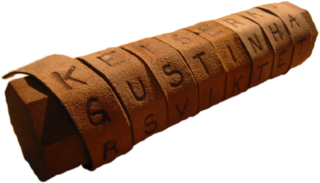
The recipient uses a rod of the same diameter on which he wraps the parchment to read the message. Read more on Wikipedia
Encoding:
<div>{{ sourceText | scytaleCipher:4 }}</div>Decoding:
<div>{{ encodedText | scytaleCipher:4:true }}</div>#Contributing
To contribute, please follow the generic Github and AngularJS Contributing Guidelines.
As best practice, start with unit tests and work your new cipher towards it.
To test your code, run grunt test and build distributable files with grunt build.
#License
The MIT License (MIT)

Copyright (c) 2015 Zsolt Szalai

Permission is hereby granted, free of charge, to any person obtaining a copy
of this software and associated documentation files (the "Software"), to deal
in the Software without restriction, including without limitation the rights
to use, copy, modify, merge, publish, distribute, sublicense, and/or sell
copies of the Software, and to permit persons to whom the Software is
furnished to do so, subject to the following conditions:

The above copyright notice and this permission notice shall be included in all
copies or substantial portions of the Software.

THE SOFTWARE IS PROVIDED "AS IS", WITHOUT WARRANTY OF ANY KIND, EXPRESS OR
IMPLIED, INCLUDING BUT NOT LIMITED TO THE WARRANTIES OF MERCHANTABILITY,
FITNESS FOR A PARTICULAR PURPOSE AND NONINFRINGEMENT. IN NO EVENT SHALL THE
AUTHORS OR COPYRIGHT HOLDERS BE LIABLE FOR ANY CLAIM, DAMAGES OR OTHER
LIABILITY, WHETHER IN AN ACTION OF CONTRACT, TORT OR OTHERWISE, ARISING FROM,
OUT OF OR IN CONNECTION WITH THE SOFTWARE OR THE USE OR OTHER DEALINGS IN THE
SOFTWARE.