
An open-source project dedicated to bringing fair, balanced, and cinematic multiplayer police chase gameplay to BeamMP
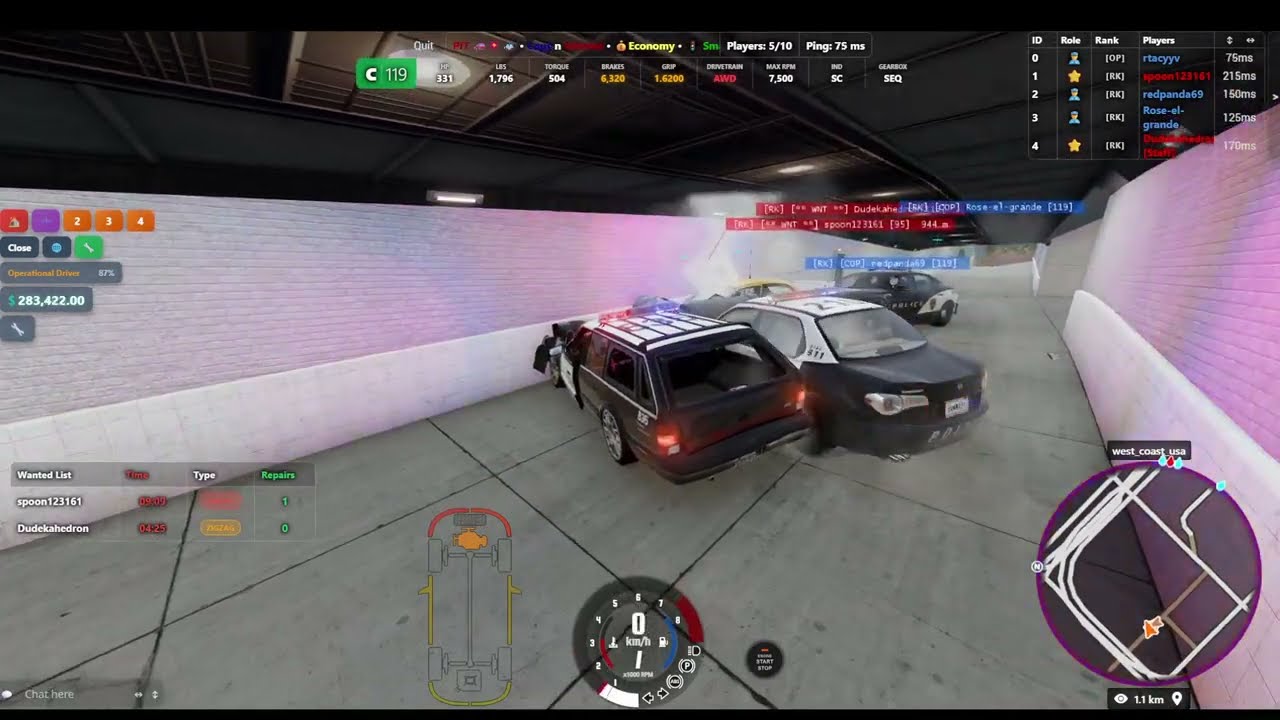
- Wanted system - speeding and zigzag violations, bust mechanic, escape system
- Rank progression - 5 ranks with task-based advancement for both roles
- Repair system - limited repairs earned through gameplay
- Parts shop - parts purchase system with free/banned vehicle series enforcement
- Minimap - real-time wanted tracking
- Multi-language - Arabic, Chinese (Simplified), Czech, English, French, German, Hebrew, Hungarian, Italian, Japanese, Polish, Portuguese (Brazil), Portuguese (Portugal), Russian, Spanish, Swedish, Turkish, Ukrainian
- Performance limiter - server-enforced vehicle rating cap with admin commands and optional community voting
- Economy - per-second income during chases, markers, money transfers
- Police / Civilian roles - detected automatically by vehicle skin
- Multi-map - West Coast USA, East Coast USA (expandable to any map)
Optional:
- Air Polluter — hidden special mission with fog effects
- Day/Night sync — server-controlled time cycle, requires a map with night lighting support
- Loading Screen — custom branded loading screen with slideshow, music, and police-themed progress bar
Each mod consists of a server-side component and a client-side package.
| Mod | Server folder | Client package |
|---|---|---|
| Economy / Wanted System / Parts Shop | UIMPIT/ |
UIMPIT.zip |
| Performance Limiter | UIMPI/ |
UIMPI.zip |
| Day/Night Sync (optional) | MPDN/ |
MPDN.zip |
| Loading Screen (optional) | — | MPLC.zip |
Click to expand
BeamMP-Server/
├── BeamMP-Server.exe
├── config_editor.pyw                       # Optional GUI config editor (Windows)
└── Resources/
    ├── Client/
    │   ├── UIMPIT.zip                          # Economy / Wanted System / Parts Shop
    │   │   ├── lua/ge/extensions/
    │   │   │   ├── key.lua                     # Core client logic & UI data bridge
    │   │   │   ├── minimap.lua                 # Minimap logic & rendering
    │   │   │   └── PartsShop.lua               # Parts Shop client logic
    │   │   ├── scripts/
    │   │   │   ├── EconomyUI/modScript.lua
    │   │   │   └── PartsShop/modScript.lua
    │   │   ├── settings/ui_apps/layouts/default/pit.uilayout.json
    │   │   └── ui/modules/apps/
    │   │       ├── BeamMP-PlayerList/
    │   │       │   ├── app.html
    │   │       │   ├── app.js
    │   │       │   ├── app.css
    │   │       │   ├── app.json
    │   │       │   ├── app.png
    │   │       │   └── redesign.css
    │   │       ├── EconomyHUD/
    │   │       │   ├── app.html
    │   │       │   ├── app.js
    │   │       │   ├── app.css
    │   │       │   ├── app.json
    │   │       │   └── app.png
    │   │       ├── PoliceWantedList/
    │   │       │   ├── app.html
    │   │       │   ├── app.js
    │   │       │   ├── app.css
    │   │       │   ├── app.json
    │   │       │   └── app.png
    │   │       └── PartsShop/
    │   │           ├── app.html
    │   │           ├── app.js
    │   │           ├── app.css
    │   │           ├── app.json
    │   │           └── app.png
    │   │
    │   ├── UIMPI.zip                           # Performance Limiter
    │   │   ├── lua/ge/extensions/performanceLimiter.lua
    │   │   ├── scripts/perf-ui/modScript.lua
    │   │   └── ui/modules/apps/perf/
    │   │       ├── app.html
    │   │       ├── app.js
    │   │       ├── app.css
    │   │       ├── app.json
    │   │       └── app.png
    │   │
    │   ├── MPDN.zip                            # Day/Night Sync (optional)
    │   │   ├── lua/ge/extensions/mpdn.lua
    │   │   └── scripts/envsync/modScript.lua
    │   │
    │   └── MPLC.zip                            # Loading Screen (optional)
    │       ├── lua/ge/extensions/srs/
    │       │   └── loading.lua
    │       ├── scripts/
    │       │   └── modScript.lua
    │       └── ui/scenic_route_loading/
    │           ├── loading_config.json
    │           ├── srs_loading.css
    │           ├── srs_loading.js
    │           ├── images/
    │           │   ├── 1.jpg … 5.jpg           # Slideshow images
    │           │   └── PIT1.gif … PIT4.gif     # Police animation overlay
    │           └── music/
    │               └── police.mp3
    │
    └── Server/
        ├── UIMPIT/                             # Economy, Wanted System, Parts Shop
        │   ├── main.lua
        │   ├── schema.sql
        │   ├── modules/
        │   │   ├── AirPolluter.lua
        │   │   ├── MinimapSystem.lua
        │   │   ├── PartsShop.lua
        │   │   └── database.lua
        │   ├── config/
        │   │   ├── config.json
        │   │   ├── db.json                     # ⚠️ Never commit
        │   │   ├── SpawnLocations.lua
        │   │   ├── PoliceSkins.lua
        │   │   ├── RanksConfig.lua
        │   │   ├── MessageColors.lua
        │   │   ├── parts_config.lua
        │   │   ├── free_vehicles.lua
        │   │   └── banned_vehicle_series.lua
        │   └── lang/
        │       ├── {ar,de,en,es,fr,he,it,ru}.json          # Mod translations
        │       └── editor_{ar,de,en,es,fr,he,it,ru}.json   # Config editor translations
        │
        ├── UIMPI/
        │   ├── main.lua
        │   └── config.json
        │
        └── MPDN/                               # Day/Night Sync (optional)
            └── main.lua
- BeamMP Server
- MySQL / MariaDB +
luasql.mysqlLua library (optional — falls back to local JSON storage)
- Place the
UIMPITandUIMPIfolders inResources/Server/ - Place
UIMPIT.zipandUIMPI.zipinResources/Client/ - Restart your BeamMP server
Optional steps:
- Run
schema.sqland fill inUIMPIT/config/db.jsonto enable MySQL — without this the server runs on local JSON storage automatically - Edit
UIMPIT/config/config.jsonto set youradminsandmoderators - Edit
UIMPI/config.jsonto set youradminsand desired rating limit - Place the
MPDNfolder inResources/Server/andMPDN.zipinResources/Client/to enable day/night sync — only if your map supports night lighting - Place
MPLC.zipinResources/Client/to enable the custom loading screen — see Loading Screen for configuration
| File | Purpose |
|---|---|
config/config.json |
Gameplay settings, timers, admins |
config/db.json |
MySQL credentials (never commit this file) |
config/SpawnLocations.lua |
Spawn points and marker locations per map |
config/PoliceSkins.lua |
Vehicle skins that grant the police role |
config/RanksConfig.lua |
Rank names, task targets, and rewards |
config/MessageColors.lua |
Controls chat message color prefixes. Add a key to apply a color, remove it to send the message uncolored |
config/parts_config.lua |
All parts with their prices (0 = free, >0 = purchasable, -1 = banned) |
config/free_vehicles.lua |
Vehicle series that bypass the purchase system |
config/banned_vehicle_series.lua |
Vehicle series that are completely prohibited |
The welcome screen (Step 4) supports optional buttons that open your Discord invite and server rulebook directly from inside the game.
⚠️ This requires editing client-side UI files. Only do this if you are comfortable with JavaScript and JSON.

1. In Resources/Client/UIMPIT.zip → ui/modules/apps/EconomyHUD/app.js, set your links near the top of the file:
var LINKS_ENABLED = true;                                // enable the buttons
var DISCORD_URL   = 'https://discord.gg/XXXXXXX';       // your Discord invite
var RULEBOOK_URL  = 'https://yoursite.com/rules';        // your rulebook URL
var SHOW_QR_CODES = false;                               // set to true if you add QR images (see below)
2. Add the 5 new translation keys to each language file in Resources/Server/UIMPIT/lang/.
A helper script is provided for this — run it once from the server root:
python add_link_translations.py
3. (Optional — QR codes) If you want QR code images to appear alongside the buttons, place two PNG files in the EconomyHUD/ folder:
qr_discord.pngqr_rulebook.png
Then set SHOW_QR_CODES = true in app.js.
A custom loading screen that replaces BeamNG's default with a branded slideshow, background music, and a police-themed animated progress bar.
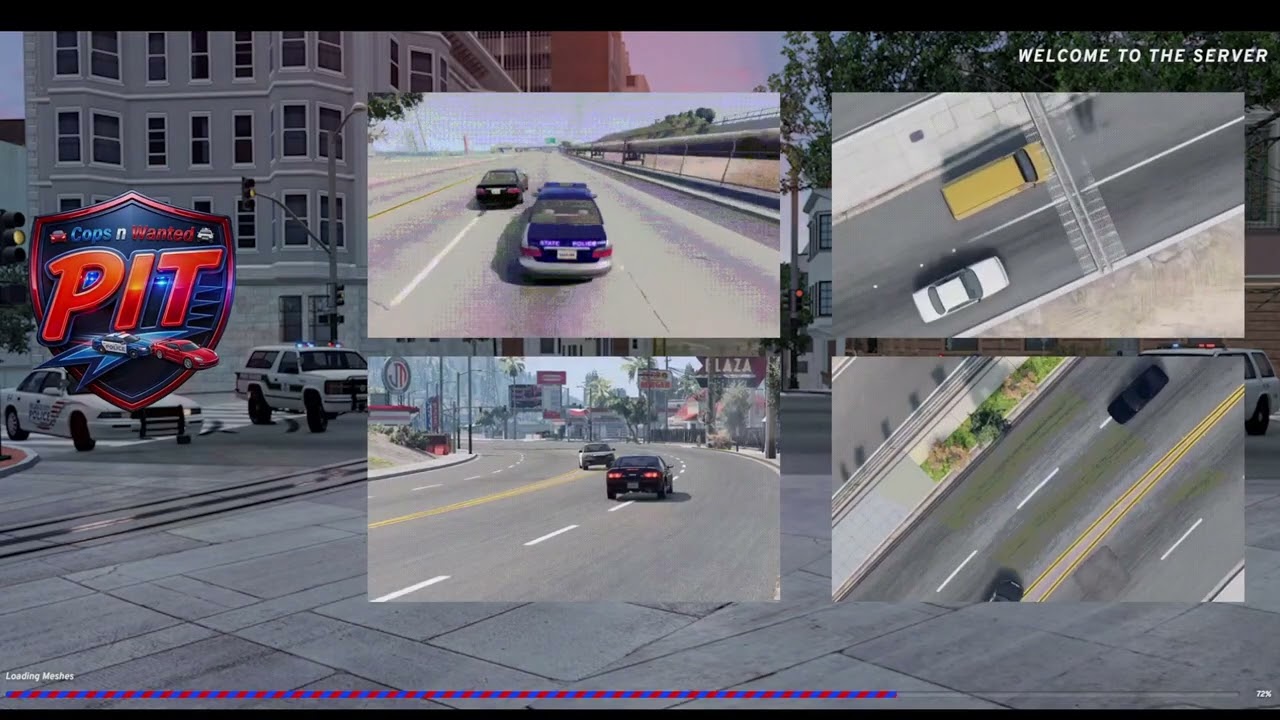
Installation: place MPLC.zip in Resources/Client/ and restart the server. No server-side files are required.
Configuration is done via ui/scenic_route_loading/loading_config.json inside the ZIP:
| Field | Default | Description |
|---|---|---|
title |
"Welcome to the server" |
Text shown in the top-right corner |
holdAfterLoadSec |
0 |
Seconds to keep the screen visible after loading completes |
slideshow.enabled |
true |
Enable/disable the image slideshow |
slideshow.intervalSec |
12 |
Seconds between image transitions |
slideshow.fadeSec |
3 |
Cross-fade duration in seconds |
slideshow.shuffle |
true |
Randomize image order |
slideshow.useStockImages |
false |
Use BeamNG's built-in loading images |
slideshow.stockCount |
18 |
How many stock images to include (if enabled) |
slideshow.images |
[...] |
List of custom image paths (JPG/PNG) |
music.enabled |
true |
Enable/disable background music |
music.volume |
0.45 |
Playback volume (0.0 – 1.0) |
music.fadeOutMs |
1500 |
Fade-out duration in milliseconds when loading ends |
music.tracks |
[...] |
List of audio file paths (MP3) |
music.shuffle |
true |
Randomize track order |
Adding your own images: place JPG/PNG files in ui/scenic_route_loading/images/ inside the ZIP and add their paths to slideshow.images.
Adding your own music: place MP3 files in ui/scenic_route_loading/music/ inside the ZIP and add their paths to music.tracks.
ℹ️ The progress bar reflects real loading progress across all BeamNG loading stages and will not reach 100% until loading is fully complete.

A graphical desktop editor that manages both UIMPIT/config/config.json and UIMPI/config.json — intended for server owners who prefer not to edit JSON manually.
Requirements: Python 3.10+ and PySide6
pip install PySide6
Run: double-click config_editor.pyw from the server root, or:
python config_editor.pyw
On Linux, double-click may not work depending on your file manager. Run from terminal instead:
python config_editor.pyw
Reads and writes config files directly, with hover tooltips for every field.
| File | Purpose |
|---|---|
config.json |
Rating cap, display offset, admins, vote settings |
| File | Purpose |
|---|---|
main.lua |
Cycle speed, sync interval, initial time preset |
| Backend | When active | Use case |
|---|---|---|
| MySQL | config/db.json present and reachable |
Multiple servers sharing one economy |
| JSON | config/db.json absent or unreachable |
Single-server |
The backend is selected automatically at startup with no code changes required.
In Resources/Server/UIMPIT/config/SpawnLocations.lua, add an entry with the exact BeamNG map folder name:
["your_map_name"] = {
    vehicles = { ... },
    markers = { ... },
    optional_spawns = { ... },
    air_polluter_marker = { x = 0, y = 0, z = 0 },
}Have questions about the mods or want to play on the server? Join the Discord
- beamsofnorway — speed detection code reference
- OfficialLambdax — day/night sync implementation (learned from published code)
- StanleyDudek — extensive help and published code examples that shaped much of this project
- Codex & MYNAMEISJEFF482 — original Scenic Route loading screen base (
srs_loading.js/srs_loading.css)
| Mod | License |
|---|---|
UIMPIT — Economy / Wanted System / Parts Shop |
AGPL-3.0 |
UIMPI — Performance Limiter |
The Unlicense (public domain) |
MPDN — Day/Night Sync |
MIT |
MPLC — Loading Screen |
MIT |
An open-source project dedicated to bringing fair, balanced, and cinematic multiplayer police chase gameplay to BeamMP
- Wanted system - speeding and zigzag violations, bust mechanic, escape system
- Rank progression - 5 ranks with task-based advancement for both roles
- Repair system - limited repairs earned through gameplay
- Parts shop - parts purchase system with free/banned vehicle series enforcement
- Minimap - real-time wanted tracking
- Multi-language - Arabic, Chinese (Simplified), Czech, English, French, German, Hebrew, Hungarian, Italian, Japanese, Polish, Portuguese (Brazil), Portuguese (Portugal), Russian, Spanish, Swedish, Turkish, Ukrainian
- Performance limiter - server-enforced vehicle rating cap with admin commands and optional community voting
- Economy - per-second income during chases, markers, money transfers
- Police / Civilian roles - detected automatically by vehicle skin
- Multi-map - West Coast USA, East Coast USA (expandable to any map)
Optional:
- Air Polluter — hidden special mission with fog effects
- Day/Night sync — server-controlled time cycle, requires a map with night lighting support
- Loading Screen — custom branded loading screen with slideshow, music, and police-themed progress bar
Each mod consists of a server-side component and a client-side package.
| Mod | Server folder | Client package |
|---|---|---|
| Economy / Wanted System / Parts Shop | UIMPIT/ |
UIMPIT.zip |
| Performance Limiter | UIMPI/ |
UIMPI.zip |
| Day/Night Sync (optional) | MPDN/ |
MPDN.zip |
| Loading Screen (optional) | — | MPLC.zip |
Click to expand
BeamMP-Server/
├── BeamMP-Server.exe
├── config_editor.pyw                       # Optional GUI config editor (Windows)
└── Resources/
    ├── Client/
    │   ├── UIMPIT.zip                          # Economy / Wanted System / Parts Shop
    │   │   ├── lua/ge/extensions/
    │   │   │   ├── key.lua                     # Core client logic & UI data bridge
    │   │   │   ├── minimap.lua                 # Minimap logic & rendering
    │   │   │   └── PartsShop.lua               # Parts Shop client logic
    │   │   ├── scripts/
    │   │   │   ├── EconomyUI/modScript.lua
    │   │   │   └── PartsShop/modScript.lua
    │   │   ├── settings/ui_apps/layouts/default/pit.uilayout.json
    │   │   └── ui/modules/apps/
    │   │       ├── BeamMP-PlayerList/
    │   │       │   ├── app.html
    │   │       │   ├── app.js
    │   │       │   ├── app.css
    │   │       │   ├── app.json
    │   │       │   ├── app.png
    │   │       │   └── redesign.css
    │   │       ├── EconomyHUD/
    │   │       │   ├── app.html
    │   │       │   ├── app.js
    │   │       │   ├── app.css
    │   │       │   ├── app.json
    │   │       │   └── app.png
    │   │       ├── PoliceWantedList/
    │   │       │   ├── app.html
    │   │       │   ├── app.js
    │   │       │   ├── app.css
    │   │       │   ├── app.json
    │   │       │   └── app.png
    │   │       └── PartsShop/
    │   │           ├── app.html
    │   │           ├── app.js
    │   │           ├── app.css
    │   │           ├── app.json
    │   │           └── app.png
    │   │
    │   ├── UIMPI.zip                           # Performance Limiter
    │   │   ├── lua/ge/extensions/performanceLimiter.lua
    │   │   ├── scripts/perf-ui/modScript.lua
    │   │   └── ui/modules/apps/perf/
    │   │       ├── app.html
    │   │       ├── app.js
    │   │       ├── app.css
    │   │       ├── app.json
    │   │       └── app.png
    │   │
    │   ├── MPDN.zip                            # Day/Night Sync (optional)
    │   │   ├── lua/ge/extensions/mpdn.lua
    │   │   └── scripts/envsync/modScript.lua
    │   │
    │   └── MPLC.zip                            # Loading Screen (optional)
    │       ├── lua/ge/extensions/srs/
    │       │   └── loading.lua
    │       ├── scripts/
    │       │   └── modScript.lua
    │       └── ui/scenic_route_loading/
    │           ├── loading_config.json
    │           ├── srs_loading.css
    │           ├── srs_loading.js
    │           ├── images/
    │           │   ├── 1.jpg … 5.jpg           # Slideshow images
    │           │   └── PIT1.gif … PIT4.gif     # Police animation overlay
    │           └── music/
    │               └── police.mp3
    │
    └── Server/
        ├── UIMPIT/                             # Economy, Wanted System, Parts Shop
        │   ├── main.lua
        │   ├── schema.sql
        │   ├── modules/
        │   │   ├── AirPolluter.lua
        │   │   ├── MinimapSystem.lua
        │   │   ├── PartsShop.lua
        │   │   └── database.lua
        │   ├── config/
        │   │   ├── config.json
        │   │   ├── db.json                     # ⚠️ Never commit
        │   │   ├── SpawnLocations.lua
        │   │   ├── PoliceSkins.lua
        │   │   ├── RanksConfig.lua
        │   │   ├── MessageColors.lua
        │   │   ├── parts_config.lua
        │   │   ├── free_vehicles.lua
        │   │   └── banned_vehicle_series.lua
        │   └── lang/
        │       ├── {ar,de,en,es,fr,he,it,ru}.json          # Mod translations
        │       └── editor_{ar,de,en,es,fr,he,it,ru}.json   # Config editor translations
        │
        ├── UIMPI/
        │   ├── main.lua
        │   └── config.json
        │
        └── MPDN/                               # Day/Night Sync (optional)
            └── main.lua
- BeamMP Server
- MySQL / MariaDB +
luasql.mysqlLua library (optional — falls back to local JSON storage)
- Place the
UIMPITandUIMPIfolders inResources/Server/ - Place
UIMPIT.zipandUIMPI.zipinResources/Client/ - Restart your BeamMP server
Optional steps:
- Run
schema.sqland fill inUIMPIT/config/db.jsonto enable MySQL — without this the server runs on local JSON storage automatically - Edit
UIMPIT/config/config.jsonto set youradminsandmoderators - Edit
UIMPI/config.jsonto set youradminsand desired rating limit - Place the
MPDNfolder inResources/Server/andMPDN.zipinResources/Client/to enable day/night sync — only if your map supports night lighting - Place
MPLC.zipinResources/Client/to enable the custom loading screen — see Loading Screen for configuration
| File | Purpose |
|---|---|
config/config.json |
Gameplay settings, timers, admins |
config/db.json |
MySQL credentials (never commit this file) |
config/SpawnLocations.lua |
Spawn points and marker locations per map |
config/PoliceSkins.lua |
Vehicle skins that grant the police role |
config/RanksConfig.lua |
Rank names, task targets, and rewards |
config/MessageColors.lua |
Controls chat message color prefixes. Add a key to apply a color, remove it to send the message uncolored |
config/parts_config.lua |
All parts with their prices (0 = free, >0 = purchasable, -1 = banned) |
config/free_vehicles.lua |
Vehicle series that bypass the purchase system |
config/banned_vehicle_series.lua |
Vehicle series that are completely prohibited |
The welcome screen (Step 4) supports optional buttons that open your Discord invite and server rulebook directly from inside the game.
⚠️ This requires editing client-side UI files. Only do this if you are comfortable with JavaScript and JSON.
1. In Resources/Client/UIMPIT.zip → ui/modules/apps/EconomyHUD/app.js, set your links near the top of the file:
var LINKS_ENABLED = true;                                // enable the buttons
var DISCORD_URL   = 'https://discord.gg/XXXXXXX';       // your Discord invite
var RULEBOOK_URL  = 'https://yoursite.com/rules';        // your rulebook URL
var SHOW_QR_CODES = false;                               // set to true if you add QR images (see below)
2. Add the 5 new translation keys to each language file in Resources/Server/UIMPIT/lang/.
A helper script is provided for this — run it once from the server root:
python add_link_translations.py
3. (Optional — QR codes) If you want QR code images to appear alongside the buttons, place two PNG files in the EconomyHUD/ folder:
qr_discord.pngqr_rulebook.png
Then set SHOW_QR_CODES = true in app.js.
A custom loading screen that replaces BeamNG's default with a branded slideshow, background music, and a police-themed animated progress bar.
Installation: place MPLC.zip in Resources/Client/ and restart the server. No server-side files are required.
Configuration is done via ui/scenic_route_loading/loading_config.json inside the ZIP:
| Field | Default | Description |
|---|---|---|
title |
"Welcome to the server" |
Text shown in the top-right corner |
holdAfterLoadSec |
0 |
Seconds to keep the screen visible after loading completes |
slideshow.enabled |
true |
Enable/disable the image slideshow |
slideshow.intervalSec |
12 |
Seconds between image transitions |
slideshow.fadeSec |
3 |
Cross-fade duration in seconds |
slideshow.shuffle |
true |
Randomize image order |
slideshow.useStockImages |
false |
Use BeamNG's built-in loading images |
slideshow.stockCount |
18 |
How many stock images to include (if enabled) |
slideshow.images |
[...] |
List of custom image paths (JPG/PNG) |
music.enabled |
true |
Enable/disable background music |
music.volume |
0.45 |
Playback volume (0.0 – 1.0) |
music.fadeOutMs |
1500 |
Fade-out duration in milliseconds when loading ends |
music.tracks |
[...] |
List of audio file paths (MP3) |
music.shuffle |
true |
Randomize track order |
Adding your own images: place JPG/PNG files in ui/scenic_route_loading/images/ inside the ZIP and add their paths to slideshow.images.
Adding your own music: place MP3 files in ui/scenic_route_loading/music/ inside the ZIP and add their paths to music.tracks.
ℹ️ The progress bar reflects real loading progress across all BeamNG loading stages and will not reach 100% until loading is fully complete.
A graphical desktop editor that manages both UIMPIT/config/config.json and UIMPI/config.json — intended for server owners who prefer not to edit JSON manually.
Requirements: Python 3.10+ and PySide6
pip install PySide6
Run: double-click config_editor.pyw from the server root, or:
python config_editor.pyw
On Linux, double-click may not work depending on your file manager. Run from terminal instead:
python config_editor.pyw
Reads and writes config files directly, with hover tooltips for every field.
| File | Purpose |
|---|---|
config.json |
Rating cap, display offset, admins, vote settings |
| File | Purpose |
|---|---|
main.lua |
Cycle speed, sync interval, initial time preset |
| Backend | When active | Use case |
|---|---|---|
| MySQL | config/db.json present and reachable |
Multiple servers sharing one economy |
| JSON | config/db.json absent or unreachable |
Single-server |
The backend is selected automatically at startup with no code changes required.
In Resources/Server/UIMPIT/config/SpawnLocations.lua, add an entry with the exact BeamNG map folder name:
["your_map_name"] = {
    vehicles = { ... },
    markers = { ... },
    optional_spawns = { ... },
    air_polluter_marker = { x = 0, y = 0, z = 0 },
}Have questions about the mods or want to play on the server? Join the Discord
- beamsofnorway — speed detection code reference
- OfficialLambdax — day/night sync implementation (learned from published code)
- StanleyDudek — extensive help and published code examples that shaped much of this project
| Mod | License |
|---|---|
UIMPIT — Economy / Wanted System / Parts Shop |
AGPL-3.0 |
UIMPI — Performance Limiter |
The Unlicense (public domain) |
MPDN — Day/Night Sync |
MIT |
MPLC — Loading Screen |
MIT |