This protocol for communication between the PLB engine and the renderer. The protocol treats the engine as the client, and the renderer as the server. The team has already developed another python script which enables the Blender as the server-side.
用于PlasticineLab引擎和renderer进行交互的协议,属于基于TCP的应用层协议。此协议以引擎侧作为客户端,渲染器侧作为服务端。我们已经开发了一个Blender Python脚本,从而将Blender作为我们的服务端。

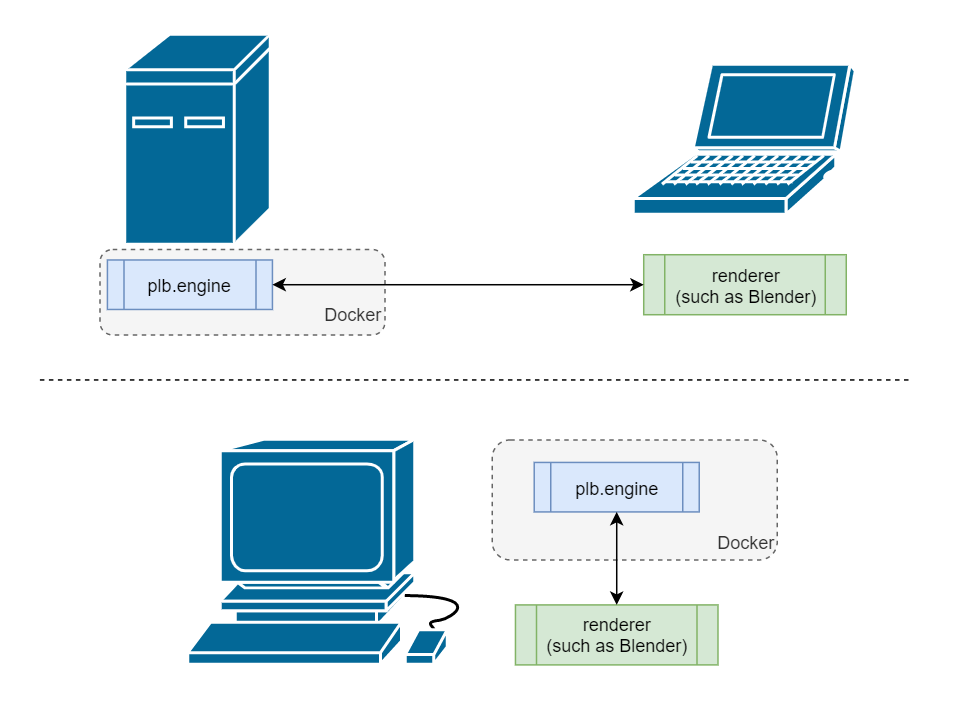
Doing such is because since the PlasticineLab requires higher computation power, expecially the preference on GPUs, usually beyond the capability of a termnal machine or a personal laptop. In practice, where the PLB models are trained or where the PLB docker containers are deployed are remote server with no available displays. This TCP-based server-client mode allows the visualization to be separated from the training or deployment. Moreoever, server and client can as well be established on the same workstation or PC.
这样做的好处是允许了需要更多计算资源甚至是GPU资源PlasticineLab和进行渲染的程序可以分别部署在不同的机器上。通常,用于训练和docker container部署的机器往往是远程的服务器,没有显示器相连接。这种基于TCP的S/C架构则可以允许可视化的模块和训练、部署的容器相互分离,如下图所示。同时,服务端和客户端也可以部署在同一台机器上,以适应不同的使用场景。
Install the following packages:
- open3d
- numpy
- scipy
- PyMCubes
The protocol defines the following messages, each type of which is derived from the BaseMessage.
协议定义了如下若干种消息
The message contains an entire meshes file, such as a *.DAE file or a *.STL file. Since a file might be too large for TCP conmunitcation, the message might be split into multiple MeshesMessage.Chunk message when being sent.
此消息包含了一个完整的以*.DAE或者*.STL格式描述的Meshes。由于一个meshes物体可能超过了TCP传输的大小限制,这个物体的meshes描述可能会被分割成若干个MeshesMessage.Chunk进行传输。
It has the following fileds:
mesh_name: the name of the meshes fileinit_pose: a 7-dim pose, i.e.[x, y, z, w_quat, x_quat, y_quat, z_quat]chunk_num: how many chunks the message is split tomesh_file: the file content
For each MeshesMessage.Chunk, the following fields are contained:
- mesh_name: the name of the meshes file, to which this chunk belongs to
- chunk_id: the index of this chunk among all the chunks splited from the original meshes file
- chunk: the content, a part of the original meshes file
The message contains a meshes created from a point cloud or SDF values. Thus, when it is sent, it will be wrapped into a MeshesMessage object.
此消息包含了一个从点云或者SDF值重构的meshes对象。因此,当它被sent的时候,会被包装成一个MeshesMessage对象。
A DeformableMeshesMessage contains the following fields:
obj_name: the name of the meshes created from this point cloudframe_idx: frame index of the meshes to appearparticles: the point cloud particlesfaces: the faces list of the created meshes
You may note that for the MeshesMessage, no frame_idx field is specified. This is because as for the objected created from meshes files, it is always regarded as the rigid-bodies, whose shape will not changed. Thus, to save the communication brandwidth, we split the initialization or pose updating into two message types. The message for updating a rigid-body object's meshes is called UpdateRigidBodyPoseMessage
你可能会注意到,MeshesMessage中没有frame_idx成员。这是因为只有从点云或SDF值重构的meshes才会被视作可形变(Deformable)物体,*.DAE或者*.STL等等格式描述的meshes则会被视作刚体。因此,对于每个frame来说,一个刚体的MeshesMessage对象之间差别只有pose不同,meshes的内容是完全一致的。为了节省带宽,我们在设计时,区分了刚体的创建和姿态更新,后者使用下面的UpdateRigidBodyPoseMessage处理。
For more details on keyframe animation, you may refer to the Animation section.
更多有关关键帧动画的细节,可以参考Animation部分。
The message contains the following fields:
name: name of the object whose pose is to be updatedpose: the new 7-dim pose vector, i.e.[x, y, z, w-quat, x-quat, y-quat, z-quat]frame_idx: the frame index at which the update is in effect
Although the MeshesMessage can handle almost all 3D shapes that might occur in the project, when it comes to the primitive shapes, such as cubes or spheres, there are pre-defined methods to initialized them easily and directly , requiring no specification of the meshes vertices, edges or faces. This AddRigidBodyPrimitive message instructs the renderer to add such a pre-defined primitive shape into the scene by mocking a remote procedure call pattern.
尽管MeshesMessage能够基本处理此项目中出现的所有3D形状,但是对于一些基本形状,例如长方体或者球体,通常renderer都会有预定义的方法来更简单、快捷地创建它们,从而不需要指定meshes顶点、边和面的具体数据。这里的AddRigidBodyPrimitive消息就可以“远程调用”对应的方法而添加相应的基本形状。
It has the following fields:
-
primitive_name: name of the primitive 3D shape -
primitive_type: the typename of this primitive type at the server side, such as forBPY:下表列出了当使用Blender作为renderer的时候,对应的
primitive_type字符串:Shape primitive_typeCube "bpy.ops.mesh.primitive_cube_add"Sphere "bpy.ops.mesh.primitive_uv_sphere_add"Icosphere "bpy.ops.mesh.primitive_ico_sphere_add"Cylinder "bpy.ops.mesh.primitive_cylinder_add"Torus "bpy.mesh.primitive_torus_add" -
params: the keyword parameters to intialize the shape, such as the scale, the number of vertices, the position, etc.
The message marks the end of the animation (see subsection ending the animation). Meanwhile, it notifies the server to cease and save the scene.
此消息标记了动画的终止帧(参见ending the animation)。同时,它告知服务端(即renderer)可以停止并保存了。
The message contains the following fields:
end_frame_idx: the index of the ending frame of the animationexp_name: the experiment name, which can serve as the filename when the renderer saves the scene.
Keyframe animation is adopted. One message is sent to update one object in one certain keyframe.
此处使用关键帧动画。一条消息会在一个关键帧中更新一个物体。
As for deformable objects, for each frame, the meshes that describing the object surface can be different. Thus, the meshes (vertices and faces) shall be sent for every keyframe. Hence, the intialization and the pose updating are exactly the same, both using the DeformableMeshesMessage with the only difference is the frame index. To initialize a deformable object, the frame index in a DeformableMeshesMessage is 0. As for the pose updating scenario, the frame index is the index of the keyframe.
对于可形变物体,每一帧它们的meshes描述(顶点、面等)可能都会不一样。因此,每一帧的消息中都必定包含meshes信息。所以,对于可形变物体而言,最初物体的创建和关键帧姿态的更新几乎没有区别,都使用了DeformableMeshesMessage;而唯一的区别只是frame index。对于创建物体来说,frame index应当设置为0,而姿态更新的frame index则是关键帧的序号。
The rigid-body objects's meshes will never changed throughout the animation. Hence, during the pose updating phase, there is no need to re-send the meshes configuration any longer. Thus, the flow for ridig-body object animation is:
- Initialize an object using
MeshesMessage. The object will be automatically put at the 0 frame. - For each keyframe, use the
UpdateRigidBodyPoseMessageto update the pose.
刚体的meshes在整个动画的过程中都应当保持不变,所以,一旦刚体已经被创建,就没有必要再反反复复发送meshes参数了。因此,对于刚体的动画,工作流程是:
- 使用
MeshesMessage初始化物体,物体会被自动地放在第0帧(初始时间)。 - 对于每一个关键帧,使用
UpdateRigidBodyPoseMessage更新刚体的姿态。
Send the FinishAnimationMessage before the engine stops. Since the message cease the renderer, no pose updating message may ever be sent after the FinishAnimationMessage.
在引擎进程退出前发送FinishAnimationMessage消息。因为这个消息会停止服务端的渲染,因此,一旦FinishAnimationMessage被发出,不可以再进行任何姿态的更新。
In the file server_utils.py, some helpful funtions for the server-side renderer has been provided. With the help of these functions, the server codes can be easily established. One may only need to develop a handler function, which modifies the renderer scenes according to the message type and content:
在文件server_utils.py中,有一些辅助函数,用来让renderer脚本的开发变得尽可能简单。开发者只需要提供一个函数来根据接收的不同类型的消息的内容来操作当前场景即可,如下所示:
import asyncio

from protocol import .

def message_handler(message: BaseMessage) -> None:
    if type(message) == MeshesMessage:
        # add the meshes to the renderer
        pass
    elif type(messasge) == DeformableMeshesMessage:
        # add or update the meshes re-constructed from the pointcloud
        pass
    ...
    pass

server = AsyncServer(message_handler)
asyncio.run(server.run_server())