Glossary Pal is a website for creating and reviewing glossary lists in order for users to learn new languages, with built-in translation using the Google Translate API. We recommend that you do not save any sensitive information on this site as it is currently in early stages of development. Try it out on https://glossary-pal.web.app.
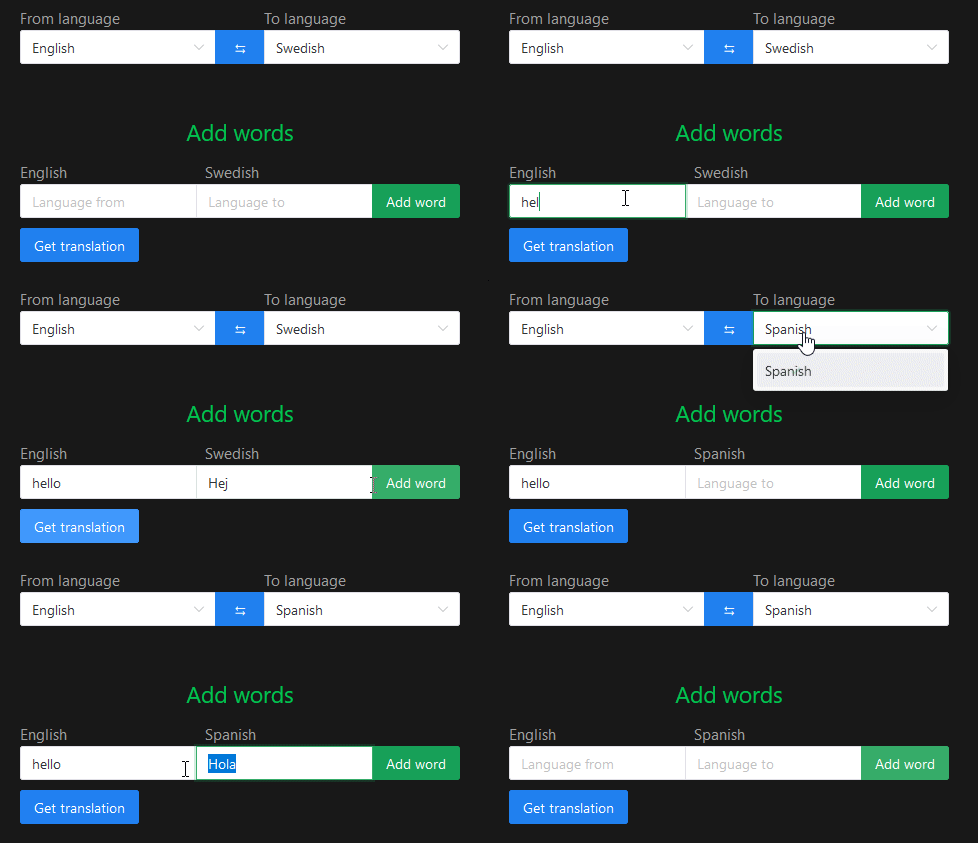
The webpage can suggest translations during the creation of glossary lists, which is possible through calls to the Google Translate API. See an example below.
Our main target groups are middle school and high school students who need to learn glossary words for homework. Our reasoning behind our design philosophy for these groups is that students probably want to be done with their homework as quickly as possible. Therefore, we have tried to create a minimalistic design, which is easy to understand at once. We have also tried to declutter all pages in order to make everything more intuitive. Because of this, students will quickly understand how to use the website, and thus be able to finish their homework faster. The API-integration with automatic translation also helps speed up the process of finishing your homework.
Everything interesting is in the src folder, where we have the folders "assets", "router", "presenters", and "views". Outside of these folders we have general Javascript code and "root" files such as App.vue and main.js.
main.js and App.vue are the backbones of the application, serving as the entry and main execution. GlossaryModel.js and Deck.js are the model files, defining the classes that are used throughout the project. apiCalls.js, resolvePromise.js, and langCodesMap.js are general Javascript code which simplifies the logic in the presenters.
index.js in the router folder is just a vue router, defining the paths of the application.
We have the following presenters: HomePresenter, CreateDeckPresenter, ReviewDeckPresenter, and PostReviewViewPresenter. Each serve as a presenter either for one view, or in the case of CreateADeck, two (which ones should be obvious). Most application logic is handled here.
As for the views, most do what you think they do: define the view but not much else. The odd one out is promiseNoData.vue, which is used in createADeckPresenter to render a loading icon while the promise is resolving (and an error if it fails).
npm installnpm run devnpm run buildFirst setup firebase integration through https://firebase.google.com/. This includes running firebase init. Then compile and minifiy for production (see above). Finally, run the following command.
firebase deployThe website will now be live. The URL we have used is https://glossary-pal.web.app.
Lint with ESLint
npm run lint