Configuration
There is no release for Lsfw. Clone the repository and build lsfw using Maven. To produce the jar file, use the goal assembly:assembly
$ mvn assembly:assembly
This produces a Java 'jar' file containing all the needed dependencies. Lsfw needs a Java virtual machine version >= 11 to be executed.
To execute Lsfw:
$ java -jar /path/lsfw-1.0-SNAPSHOT-jar-with-dependencies.jar [lsfw command line options]
Error like: at org.parboiled.MatcherContext.runMatcher(MatcherContext.java:338)

$ java -Xss32m -jar /path/....
In this documentation, I consider that a shell alias 'lsfw' is defined and allows to run Lsfw easily.
Example for the tcsh shell, using rlwrap to run java:
alias lsfw rlwrap java -jar /path/lsfw-1.0-SNAPSHOT-jar-with-dependencies.jar
ℹ️ Lsfw is text-based and uses the standard input. Unfortunately it does not permit the editing of keyboard input. rlwrap is a small tool, a readline wrapper, to allow the editing of keyboard input for any command. I strongly suggest to use it. rlwrap is available on many Unix like systems: http://freshmeat.net/projects/rlwrap/
The configuration is made by several files. One file describes the main configuration, other files depend on the type of the equipments. There is at least one file by equipment.
The main configuration file uses the XML format and describes: the equipments and the topology of the network. It also allows to define options which are global to the applications (such as services database).
Each equipment must have an XML entity <equipment> in the main configuration file describing:
- The name of the Java class corresponding to this equipment. The Java class is the piece of software handling the equipment.
- The name of the equipment. This name identifies the equipment and must be unique. It must not contain space or special character.
- A comment for the equipment. This comment is displayed in various places.
- The filename, including path, of the file describing the Lsfw configuration of the equipment. The format of this file is specific to the equipment, please refer to the documentation of the equipment.
<equipment classname="name.of.the.java.class"
    name="name-of-the-equipment"
    comment="this is a free comment"
    filename="/path/configuration.file.xml"
/>
Example:
<equipment classname="fr.univrennes1.cri.jtacl.equipments.cisco.router.CiscoRouter"
   name="cisco-gateway"
   comment="gateway"
   filename="./gateway.xml"
/>
Checkpoint firewall module
Checkpoint firewall module R80
Cisco router module
Fortinet Fortigate firewall module
OpenBSD Packet Filter (PF) module
Cisco PIX/FWSM module
Proxmox VE Firewall
Simple router module
In Lsfw, the topology is described by some objects named 'network links', connecting interfaces to each other by a 'network'. Lsfw builds the topology using the addresses IP of the interfaces and connects interfaces sharing the same network.
In some cases, we should specify the links manually because this 'auto-magical' behavior does not build a topology that match the reality. We also have to specify the borders of the network. This is done by specifying 'topological links' in the configuration.
A topological link specifies:
- the network IP address.
- a list of equipment in the form equipment|IPaddress[, equipment|IPaddress, ...]
- a flag telling us if the network is a border network.
In the configuration, topological links are represented by a <tlink> XML entity.
<tlink network="IPAddress" topology="equipment1|IPaddress1 [, equipment2|IPAddress2, ...]" [border="true"] />
The network attribute specifies the network IP address, and the topology attribute specifies the topology of this network. The border attribute is optional and, if true, specifies that this network is a 'border network'. In Lsfw a 'border network' means that all packets/probes reaching it also reach their destination.
For more information on the topology, see also How it works.
Examples:
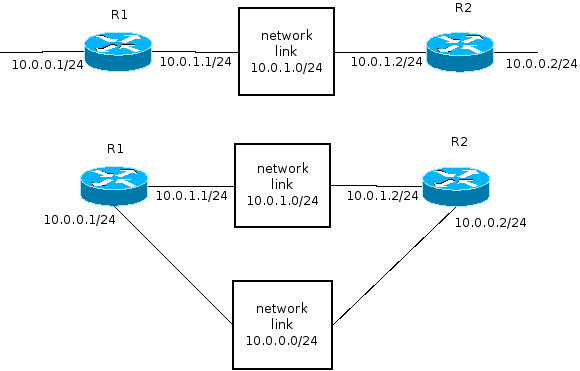
We have two routers, each one owns a private network of IP address 10.0.0.0/24. The default behavior is to link these two networks by one network link. But this is not what we want, so we must specify two topological links:
<tlink network="10.0.0.0/24" topology="R1|10.0.0.1" />
<tlink network="10.0.0.0/24" topology="R2|10.0.0.2" />
The following topological link links three routers via a network of IP address 10.0.0.0/24 (this is not intended to have any sense!):
<tlink network="10.0.0.0/24" topology="R1|192.168.1.1, R2|192.168.1.2, R3|192.168.1.3" />
The router R1 is connected to Internet (so to another router) and we don't care about what happens behind this router. This is a border:
<tlink network="XXXXX" topology="R1|IP" border="true" />
Lsfw uses its own services, protocols, icmp and icmp6 databases used for name resolution. The configuration allows to override each database by providing a file with the same format as the built-in one. <note>Domain name resolution uses the system's resolver and does not need any configuration</note>
Built-in file:
https://raw.githubusercontent.com/plamaiziere/lsfw/main/src/main/resources/ip/services
Configuration:
<services filename="/pathtofile/services" />
Built-in file:
https://raw.githubusercontent.com/plamaiziere/lsfw/main/src/main/resources/ip/protocols
Configuration:
<protocols filename="/pathtofile/protocols" />
Built-in file:
https://raw.githubusercontent.com/plamaiziere/lsfw/main/src/main/resources/ip/icmp
Configuration:
<icmp4 filename="/pathtofile/icmp" />
Built-in file:
https://raw.githubusercontent.com/plamaiziere/lsfw/main/src/main/resources/ip/icmp6
Configuration:
<icmp6 filename="/pathtofile/icmp6" />
Lsfw allows to define variables and to use them in the built-in shell as macro, preceded by the character '$'. Variable are defined using a <define> XML entity, a name and a value.
<define name="ANAME value="some text" />
Then it is possible to use the defined variable ANAME using $ANAME, Lsfw substitutes the macro by the value.
The DFLTEQUIPMENT variable, if defined, is used by the probe command when Lsfw does not find any suitable IPv4 network to inject a probe. See the help of the probe command.
The DFLTEQUIPMENT6 variable, if defined, is used by the probe command when Lsfw does not find any suitable IPv6 network to inject a probe. See the help of the probe command.
https://raw.githubusercontent.com/plamaiziere/lsfw/main/doc/config/jtacl.xml