Tutorial
This quick tutorial describes the configuration and the use of Jtacl for the following network :
R1 is a Cisco router, R1 is connected to R2 and P1. R2 is the router of an other entity but we don't manage its rules. P1 is a firewall based on OpenBSD and Packet Filter, protecting the internal network and a DMZ.
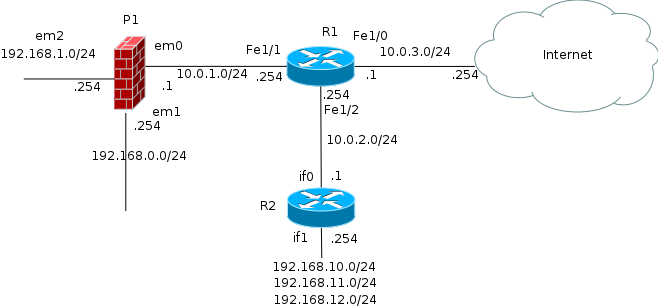
The files for this tutorial are available in the doc/tutorial directory:
All configuration files are XML files, use a text editor to edit them. The use of an XML aware editor is easier.
1) Create a new directory on the disk to store all configuration files.
In this tutorial we use a directory "tutorial"
2) Create an XML file for the main configuration. Here we use the name
"jtacl.xml"
3) Basic configuration:
The main configuration file must describe each network equipment and
allow to specify few parameters. The template file jtacl.xml in the
Jtacl project can be used to cut and paste definitions.
The "jtacl.xml" file must contains a root XML entity ("<jtacl>") and equipments definition in the entity "<equipments>". Jtacl doesn't enforce the use of these entities but, at least, a root entity is needed. In this tutorial, the XML hierarchy is (I strongly suggest to follow it):
<jtacl>
    <!-- definitions of the equipments -->
    <equipments>
    </equipments>

    <!-- definition of the topology -->
    <topology>
    </topology>

    <!-- shell defines (macros) -->
    <shell>
    </shell>

    <!-- names databases override -->
    <databases>
    </databases>

</jtacl>
We start with R1:
R1 is a Cisco router and so is handled by the Jtacl's module
fr.univrennes1.cri.jtacl.equipments.cisco.router.CiscoRouter.
In the jtacl.xml template, cut the description of a Cisco router and
paste it into the jtacl.xml configuration file, between the entity
<equipments></equipments>:
<!-- Cisco IOS Router -->
<equipment
    classname="fr.univrennes1.cri.jtacl.equipments.cisco.router.CiscoRouter"
    name="crouter1"
    comment="cisco router #1"
    filename="./ciscorouter.xml"
/>
Then we change the name of this equipment to "R1", the comment to
"router #1" and the filename to "r1.xml":
The name of an equipment must not contains special characters (such as
space, '|'), but Jtacl doesn't yet enforce this. Letters, digits and
'-', '_' are ok.
We obtain after edition:
<!-- Cisco IOS Router -->
<equipment
    classname="fr.univrennes1.cri.jtacl.equipments.cisco.router.CiscoRouter"
    name="R1"
    comment="router #1"
    filename="./r1.xml"
/>
R2 is not managed by our services and we don't have the native configuration of this router. We can use a "SimpleRouter" equipment to describe it in Jtacl. Cut, paste and edit the definition of a SimpleRouter as we did for R1.
We obtain after edition:
<!-- Generic Router -->
<equipment
    classname="fr.univrennes1.cri.jtacl.equipments.SimpleRouter"
    name="R2"
    comment="router #2"
    filename="./r2.xml"
/>
P1 is a firewall based on OpenBSD PacketFilter. We can use a "PacketFilter" equipment to describe it in Jtacl. Cut, paste and edit the definition of a PacketFilter.
We obtain after edition:
<!-- OpenBSD PacketFilter -->
<equipment
    classname="fr.univrennes1.cri.jtacl.equipments.openbsd.PacketFilter"
    name="P1"
    comment="firewall #1"
    filename="./p1.xml"
/>
Now we must configure each equipment. The configuration of an equipment depends on its type and is made via a configuration file in XML format. Templates file are available in the Jtacl project.
Copy the template file "ciscorouter.xml" to the tutorial directory and save it as "r1.xml" (the file name used in the main configuration).
The only needed parameter is the path to the Cisco native configuration file of this router. This file is named "r1-conf" and is stored in a sub-directory "conf/":
Edit the configuration file as:
<!-- list of the native Cisco files of the router -->
<file filename="./conf/r1-conf" />
In the real life, R1 obtains its routes to internet using BGP and Jtacl is not able to know this routing. We work-around this problem by adding a default route to Internet. Cut and paste a route definition from the template file "routing.xml" and add it in the entity "<routing>".
The default gateway is 10.0.3.254:
<routing>
    <!-- default route to internet -->
    <route prefix="0.0.0.0/0" nexthop="10.0.3.254" />
</routing>
As said, R2 is managed by an external entity and we don't have its
configuration. We build a configuration to match the topology.
Copy the template file "simplerouter.xml" to the tutorial directory and
save it as "r2.xml" (the file name used in the main configuration).
First we configure the interfaces of this router. "if0" is connected to R1, "if1" handles the internal networks of this router.
<!-- definitions of the interfaces -->
<iface name="if0" comment="interface 0" ip="10.0.2.1" network="10.0.2.0/24"/>

<iface name="if1" comment="interface 1" ip="192.168.10.254" network="192.168.10.0/24"/>
<iface name="if1" ip="192.168.11.254" network="192.168.11.0/24"/>
<iface name="if1" ip="192.168.12.254" network="192.168.12.0/24"/>
And we add a default route to R1.
<routing>
    <!-- default route to R1 -->
    <route prefix="0.0.0.0/0" nexthop="10.0.2.254" />
</routing>
P1 is based on OpenBSD Packet Filter, copy the template file "packetfilter.xml" and save it as "p1.xml".
Jtacl is not able to parse the native OpenBSD "hostname.*" files and the interfaces and the routing must be configured by hand.
Interfaces:
<!-- interfaces -->
<iface name="em0" comment="em0" ip="10.0.1.1" network="10.0.1.0/24" />
<iface name="em1" comment="em1" ip="192.168.0.254" network="192.168.0.0/24" />
<iface name="em2" comment="em2" ip="192.168.1.254" network="192.168.1.0/24" />
The path to the "pf.conf" file of the equipment must be specified, here it is stored in "./conf/pf.conf":
<!-- PacketFilter file (pf.conf) -->
<pfconf filename="./conf/pf.conf" />
And we add a default route to R1:
<routing>
    <route prefix="0.0.0.0/0" nexthop="10.0.1.254" />
</routing>
Now the configuration is completed and we can start to play with Jtacl.
Configure a shell alias 'jtacl' to be able to start Jtacl using rlwrap as explained in the User manual - Installation and configuration
The first thing to check is the topology of the network, is it the good one? The second thing is the routing.
Change the current directory to the "tutorial" directory:
$ cd tutorial
And start Jtacl, increase the verbosity of the configuration with the option "config.level=ALL":
$ jtacl -f jtacl.xml --option config.level=ALL
Then jtacl displays a warning because it does not know the lo0 interface
in pf.conf (lo0 is the loopback). It is safe to ignore this warning. And
it prompts for command:
[WARNING]File: ./conf/pf.conf line#: 24 set skip on lo0 : unknown interface: lo0 jtacl>
We now check the topology. The topology in Jtacl is made by some network links connecting each equipment to each other. The command "topology" displays the topology:
jtacl> topology
10.0.1.0/24 {R1(FastEthernet1/1 - 10.0.1.254), P1(em0 - 10.0.1.1)}
10.0.2.0/24 {R2(if0 - 10.0.2.1), R1(FastEthernet1/2 - 10.0.2.254)}
10.0.3.0/24 {R1(FastEthernet1/0 - 10.0.3.1)}
192.168.0.0/24 {P1(em1 - 192.168.0.254)}
192.168.1.0/24 {P1(em2 - 192.168.1.254)}
192.168.10.0/24 {R2(if1 - 192.168.10.254)}
192.168.11.0/24 {R2(if1 - 192.168.11.254)}
192.168.12.0/24 {R2(if1 - 192.168.12.254)}
The first part of a network link is the network owned by the link (example: 10.0.1.0), the second part (between '{' and '}') displays the interfaces of the equipments connected by this link.
For example, the first line "10.0.1.0/24 {R1(FastEthernet1/1 -
10.0.1.254), P1(em0 - 10.0.1.1)}" means that the network 10.0.1.0/24
connects the equipment R1 (interface FastEthernet1/1 ip: 10.0.1.254)
with the equipment P1 (interface em0, ip: 10.0.1.1).
The line "192.168.0.0/24 {P1(em1 - 192.168.0.254)}" means that the
network 192.168.0.0/24 is only connected to P1. This is a leaf network.
Here the topology is good, you can compare to the network diagram to be sure.
As a bonus, the command topology can be useful to find where is an IP on the network:
jtacl> t 192.168.0.50
192.168.0.0/24 {P1(em1 - 192.168.0.254)}
The second step is to check the routing. On a small network it is easy to check it by hand using the "probe command". For example, a check from 10.0.0.1/24 to 10.0.1.0/24:
jtacl> p 192.168.0.0/24 192.168.1.0/24
###############################
-------- Routed probes --------
Path:
On: P1 (firewall #1)
    em1 (em1)
        interface IP: 192.168.0.254 network: 192.168.0.0/24
    em2 (em2)
        interface IP: 192.168.1.254 network: 192.168.1.0/24
        nexthop: 192.168.1.0/24

------
P1 (firewall #1)
Matching ACL on input: em1 (em1)
[...]
Matching ACL on output: em2 (em2)
[...]
-----------------

Global ACL result is: ACCEPT
Global routing result is: ROUTED
The path section of the output is the path followed by the probe. The Global routing result at the end, is the result of the routing. Here it is ROUTED, it means that the probe has reach its destination. For the moment, we do not care about the ACL.
On a large network, it will be painful to test all the routing. A trick is to build a test suite from the topology (extracted with awk) and to run the probe command in the test mode. For example, the test above can be put in a test suite:
probe expect ROUTED 192.168.0.0/24 192.168.1.0/24
And run with:
$ echo "probe expect ROUTED 192.168.0.0/24 192.168.1.0/24" | jtacl -f jtacl.xml -t
probe expect ROUTED 192.168.0.0/24 192.168.1.0/24 [OK]
The probe command allows to probe the network from a source network to a destination network.
For example, we probe the ACL from the network 192.168.1.0/24 to 192.168.0.0/24:
jtacl> probe 192.168.0.0/24 192.168.1.0/24
###############################
-------- Routed probes --------
Path:
On: P1 (firewall #1)
    em1 (em1)
        interface IP: 192.168.0.254 network: 192.168.0.0/24
    em2 (em2)
        interface IP: 192.168.1.254 network: 192.168.1.0/24
        nexthop: 192.168.1.0/24

------
P1 (firewall #1)
Matching ACL on input: em1 (em1)
    DENY ./conf/pf.conf #26: block all
  ACCEPT ./conf/pf.conf #27: pass quick inet proto icmp from any to any icmp-type echoreq
  ACCEPT ./conf/pf.conf #28: pass quick inet proto icmp from any to any icmp-type timex
  ACCEPT ./conf/pf.conf #29: pass quick inet proto icmp from any to any icmp-type unreach code needfrag
  ACCEPT ./conf/pf.conf #30: pass quick inet proto icmp from any to any icmp-type trace
  ACCEPT ./conf/pf.conf #31: pass quick inet proto icmp from any to any icmp-type unreach
    DENY ./conf/pf.conf #32: block quick inet proto icmp from any to any
    DENY ./conf/pf.conf #33: block quick proto { tcp, udp } from any to any port $smbports
     MAY ./conf/pf.conf #35: pass proto udp from <snmpable> to $nagios port snmp-trap
     MAY ./conf/pf.conf #42: pass proto tcp from $mailserver to any port smtp
    DENY ./conf/pf.conf #45: block in on $dmzif from any to $intif:network
Matching ACL on output: em2 (em2)
    DENY ./conf/pf.conf #26: block all
  ACCEPT ./conf/pf.conf #27: pass quick inet proto icmp from any to any icmp-type echoreq
  ACCEPT ./conf/pf.conf #28: pass quick inet proto icmp from any to any icmp-type timex
  ACCEPT ./conf/pf.conf #29: pass quick inet proto icmp from any to any icmp-type unreach code needfrag
  ACCEPT ./conf/pf.conf #30: pass quick inet proto icmp from any to any icmp-type trace
  ACCEPT ./conf/pf.conf #31: pass quick inet proto icmp from any to any icmp-type unreach
    DENY ./conf/pf.conf #32: block quick inet proto icmp from any to any
    DENY ./conf/pf.conf #33: block quick proto { tcp, udp } from any to any port $smbports
     MAY ./conf/pf.conf #35: pass proto udp from <snmpable> to $nagios port snmp-trap
     MAY ./conf/pf.conf #42: pass proto tcp from $mailserver to any port smtp

-----------------

Global ACL result is: ACCEPT
Global routing result is: ROUTED
Jtacl displays all the rules matching the probe request. The Global ACL result is ACCEPT, meaning that "some" packets can be accepted. As the request is not accurate, the result is also not accurate. We could precise the request, for example if we want to know the rules matching icmp:
jtacl> probe 192.168.0.0/24 192.168.1.0/24 icmp
###############################
-------- Routed probes --------
Path:
On: P1 (firewall #1)
    em1 (em1)
        interface IP: 192.168.0.254 network: 192.168.0.0/24
    em2 (em2)
        interface IP: 192.168.1.254 network: 192.168.1.0/24
        nexthop: 192.168.1.0/24

------
P1 (firewall #1)
Matching ACL on input: em1 (em1)
    DENY ./conf/pf.conf #26: block all
  ACCEPT ./conf/pf.conf #27: pass quick inet proto icmp from any to any icmp-type echoreq
  ACCEPT ./conf/pf.conf #28: pass quick inet proto icmp from any to any icmp-type timex
  ACCEPT ./conf/pf.conf #29: pass quick inet proto icmp from any to any icmp-type unreach code needfrag
  ACCEPT ./conf/pf.conf #30: pass quick inet proto icmp from any to any icmp-type trace
  ACCEPT ./conf/pf.conf #31: pass quick inet proto icmp from any to any icmp-type unreach
    DENY ./conf/pf.conf #32: block quick inet proto icmp from any to any
    DENY ./conf/pf.conf #45: block in on $dmzif from any to $intif:network
Matching ACL on output: em2 (em2)
    DENY ./conf/pf.conf #26: block all
  ACCEPT ./conf/pf.conf #27: pass quick inet proto icmp from any to any icmp-type echoreq
  ACCEPT ./conf/pf.conf #28: pass quick inet proto icmp from any to any icmp-type timex
  ACCEPT ./conf/pf.conf #29: pass quick inet proto icmp from any to any icmp-type unreach code needfrag
  ACCEPT ./conf/pf.conf #30: pass quick inet proto icmp from any to any icmp-type trace
  ACCEPT ./conf/pf.conf #31: pass quick inet proto icmp from any to any icmp-type unreach
    DENY ./conf/pf.conf #32: block quick inet proto icmp from any to any

-----------------

Global ACL result is: ACCEPT
Global routing result is: ROUTED
Or to check that the port 445 is denied:
jtacl> probe 192.168.0.0/24 192.168.1.0/24 tcp 445
###############################
-------- Routed probes --------
Path:
On: P1 (firewall #1)
    em1 (em1)
        interface IP: 192.168.0.254 network: 192.168.0.0/24
    em2 (em2)
        interface IP: 192.168.1.254 network: 192.168.1.0/24
        nexthop: 192.168.1.0/24

------
P1 (firewall #1)
Matching ACL on input: em1 (em1)
    DENY ./conf/pf.conf #26: block all
    DENY ./conf/pf.conf #33: block quick proto { tcp, udp } from any to any port $smbports
    DENY ./conf/pf.conf #45: block in on $dmzif from any to $intif:network
Matching ACL on output: em2 (em2)
    DENY ./conf/pf.conf #26: block all
    DENY ./conf/pf.conf #33: block quick proto { tcp, udp } from any to any port $smbports

-----------------

Global ACL result is: DENY
Global routing result is: ROUTED
To finish, a probe from the DMZ to a host on internet (1.2.3.4) using the destination port http:
jtacl> probe 192.168.1.0/24 1.2.3.4 tcp http
###############################
-------- Routed probes --------
Path:
On: P1 (firewall #1)
    em2 (em2)
        interface IP: 192.168.1.254 network: 192.168.1.0/24
    em0 (em0)
        interface IP: 10.0.1.1 network: 10.0.1.0/24
        nexthop: 10.0.1.254
On: R1 (cisco router #1)
    FastEthernet1/1 (INTERNAL)
        interface IP: 10.0.1.254 network: 10.0.1.0/24
    FastEthernet1/0 (internet)
        interface IP: 10.0.3.1 network: 10.0.3.0/24
        nexthop: 10.0.3.254

------
P1 (firewall #1)
Matching ACL on input: em2 (em2)
    DENY ./conf/pf.conf #26: block all
  ACCEPT ./conf/pf.conf #46: pass in on $intif from any to !$dmzif:network
Matching ACL on output: em0 (em0)
    DENY ./conf/pf.conf #26: block all
  ACCEPT ./conf/pf.conf #48: pass out on $extif

------
R1 (cisco router #1)
Matching ACL on input: FastEthernet1/1 (INTERNAL)
    DENY r1-conf #78: [INTERNAL_IN] deny tcp any range 135 139 any
    DENY r1-conf #79: [INTERNAL_IN] deny tcp any eq 445 any
    DENY r1-conf #80: [INTERNAL_IN] deny tcp any eq 593 any
  ACCEPT r1-conf #81: [INTERNAL_IN] permit ip any any
    DENY [INTERNAL_IN] *** implicit deny ***
Matching ACL on output: FastEthernet1/0 (internet)
    DENY r1-conf #59: [INTERNET_OUT] deny tcp any range 135 139 any
    DENY r1-conf #60: [INTERNET_OUT] deny tcp any eq 445 any
    DENY r1-conf #61: [INTERNET_OUT] deny tcp any eq 593 any
  ACCEPT r1-conf #62: [INTERNET_OUT] permit ip any any
    DENY [INTERNET_OUT] *** implicit deny ***

-----------------

Global ACL result is: DENY
Global routing result is: ROUTED
It is important to note that some rules match on the source port, because we have specified only the destination port (http):
R1 (cisco router #1)
Matching ACL on input: FastEthernet1/1 (INTERNAL)
    DENY r1-conf #78: [INTERNAL_IN] deny tcp any range 135 139 any
To avoid this, we should specify a source port (like 32768):
jtacl> probe 192.168.1.0/24 1.2.3.4 tcp 32768:80
###############################
-------- Routed probes --------
Path:
On: P1 (firewall #1)
    em2 (em2)
        interface IP: 192.168.1.254 network: 192.168.1.0/24
    em0 (em0)
        interface IP: 10.0.1.1 network: 10.0.1.0/24
        nexthop: 10.0.1.254
On: R1 (cisco router #1)
    FastEthernet1/1 (INTERNAL)
        interface IP: 10.0.1.254 network: 10.0.1.0/24
    FastEthernet1/0 (internet)
        interface IP: 10.0.3.1 network: 10.0.3.0/24
        nexthop: 10.0.3.254

------
P1 (firewall #1)
Matching ACL on input: em2 (em2)
    DENY ./conf/pf.conf #26: block all
  ACCEPT ./conf/pf.conf #46: pass in on $intif from any to !$dmzif:network
Matching ACL on output: em0 (em0)
    DENY ./conf/pf.conf #26: block all
  ACCEPT ./conf/pf.conf #48: pass out on $extif

------
R1 (cisco router #1)
Matching ACL on input: FastEthernet1/1 (INTERNAL)
  ACCEPT r1-conf #81: [INTERNAL_IN] permit ip any any
    DENY [INTERNAL_IN] *** implicit deny ***
Matching ACL on output: FastEthernet1/0 (internet)
  ACCEPT r1-conf #62: [INTERNET_OUT] permit ip any any
    DENY [INTERNET_OUT] *** implicit deny ***

-----------------

Global ACL result is: ACCEPT
Global routing result is: ROUTED
Voilà! That's all for this tutorial. Please refer to the documentation for a complete description.